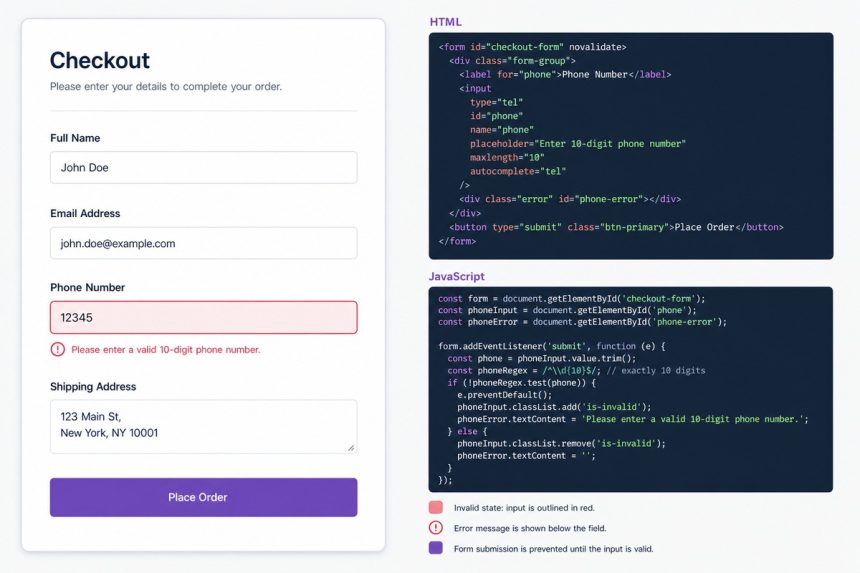
To enforce a minimum phone-number length in WooCommerce (e.g. exactly 11 digits for Bangladeshi or 10 for US/CA), hook woocommerce_checkout_process for server-side validation and use the pattern/maxlength input attributes for client-side UX. The server check is the one that actually enforces the rule; the client attributes give users instant feedback.
Last verified: 2026-05-17 on WooCommerce 9.0 + WordPress 6.5. Originally published 2023-07-14, rewritten and updated 2026-05-17.
The complete snippet
// Server-side validation — the one that actually enforces the rule
add_action( 'woocommerce_checkout_process', function () {
    if ( isset( $_POST['billing_phone'] ) ) {
        $digits = strlen( preg_replace( '/[^0-9]/', '', wp_unslash( $_POST['billing_phone'] ) ) );

        if ( 11 !== $digits ) {
            wc_add_notice(
                __( '<strong>Phone number</strong> must be 11 digits long.', 'your-textdomain' ),
                'error'
            );
        }
    }
} );

// Client-side UX — instant feedback before submit
add_action( 'wp_footer', function () {
    if ( ! is_checkout() ) {
        return;
    } ?>
    <script>
        jQuery(function ($) {
            $('#billing_phone')
                .attr('pattern',   '[0-9]{11}')
                .attr('maxlength', '11')
                .attr('title',     'Phone number must be 11 digits');

            $(document).ajaxComplete(function (event, xhr, settings) {
                try {
                    if (
                        settings.url.indexOf('?wc-ajax=checkout') !== -1 &&
                        xhr.responseJSON.result === 'failure' &&
                        xhr.responseJSON.messages.toLowerCase().indexOf('phone') !== -1
                    ) {
                        $('#billing_phone_field')
                            .addClass('woocommerce-invalid woocommerce-invalid-required-field')
                            .removeClass('woocommerce-validated');
                    }
                } catch (e) { /* ignore */ }
            });
        });
    </script>
<?php } );
Drop this in your child theme’s functions.php or a small site-specific plugin. The server hook rejects invalid submissions; the footer script attaches client-side validation and visually marks the phone field as invalid when the server returns a phone-related error.
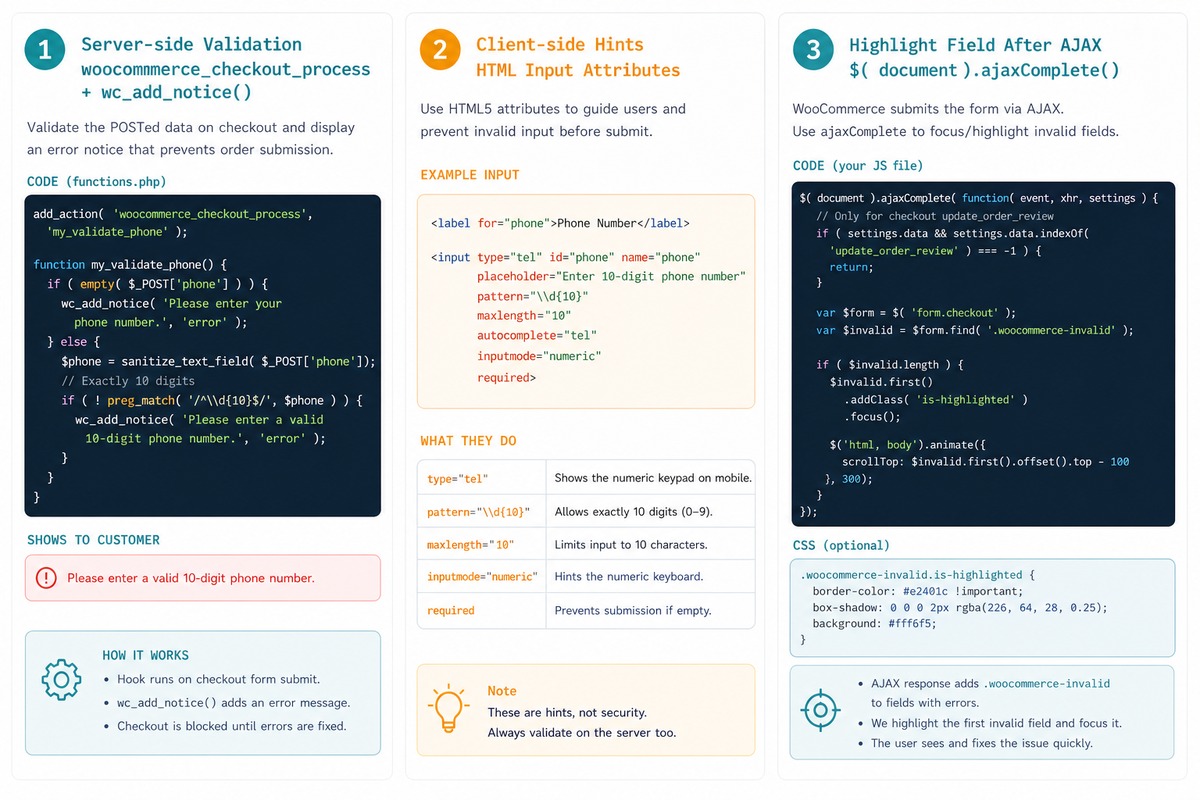
What each piece does
woocommerce_checkout_process— fires server-side during checkout submission. Adding an error notice here stops the order from completing.preg_replace('/[^0-9]/', '', $phone)— strips formatting (spaces, dashes, plus signs) before counting digits, so+880 1234-567890and01234567890are both valid.pattern="[0-9]{11}"— HTML5 input pattern. The browser blocks submission with a built-in error message when the value doesn’t match.maxlength="11"— caps typing at 11 characters in the input field itself.- The
ajaxCompletehandler — the WooCommerce checkout submits via Ajax, and on a server-side validation failure WC returns a JSON response withmessages. We watch for phone-related failures and visually mark the field invalid so the error is easy to spot.
Variations
// Allow 10 OR 11 digits
$digits = strlen( preg_replace( '/[^0-9]/', '', wp_unslash( $_POST['billing_phone'] ) ) );
if ( ! in_array( $digits, [ 10, 11 ], true ) ) {
    wc_add_notice( __( 'Phone must be 10 or 11 digits.', 'your-textdomain' ), 'error' );
}

// Require a country prefix
if ( ! preg_match( '/^\+?880\d{10}$/', $_POST['billing_phone'] ) ) {
    wc_add_notice( __( 'Phone must start with +880 followed by 10 digits.', 'your-textdomain' ), 'error' );
}
Frequently asked questions
Client-side validation (the pattern attribute) gives instant feedback before the form even submits — friendlier UX. Server-side validation (the woocommerce_checkout_process hook) is what actually enforces the rule, because client validation can be bypassed by anyone with DevTools. Always validate on the server; treat the client validation as a usability layer, not a security boundary.
Change the strict != 11 check to !in_array($phone, [10, 11], true). For more nuance — different countries, different valid formats — drop your own validation entirely and use a library like libphonenumber. It parses, validates, and formats numbers per E.164 rules so you don’t have to maintain country-specific regexes.
The woocommerce_checkout_process hook fires on the legacy shortcode checkout. For the new Cart/Checkout blocks, validation hooks differ — register a Store API validation rule with woocommerce_store_api_checkout_update_order_from_request or use the extend API to attach field-level rules. The pattern from this guide still works on the shortcode checkout, which is what most existing stores still use.
preg_replace('/[^0-9]/', '', ...) when checking length? Customers often type formatting characters — spaces, dashes, parentheses, plus signs (+880-1234-567890). Counting the raw string would reject valid input. Stripping non-digits first means we count only the digits and ignore decoration. If you want to allow a leading +, adjust to preg_replace('/[^0-9+]/', '', ...).
Related guides
- How to Remove Checkout Fields in WooCommerce
- How to Rename Menu Items on the WooCommerce My Account Page
- How to Add a Custom Fee in WooCommerce
References
WooCommerce woocommerce_checkout_process hook: woocommerce.com/document/customizing-the-checkout-field-using-actions-and-filters. WordPress wc_add_notice: woocommerce.github.io/code-reference. libphonenumber for PHP: github.com/giggsey/libphonenumber-for-php.