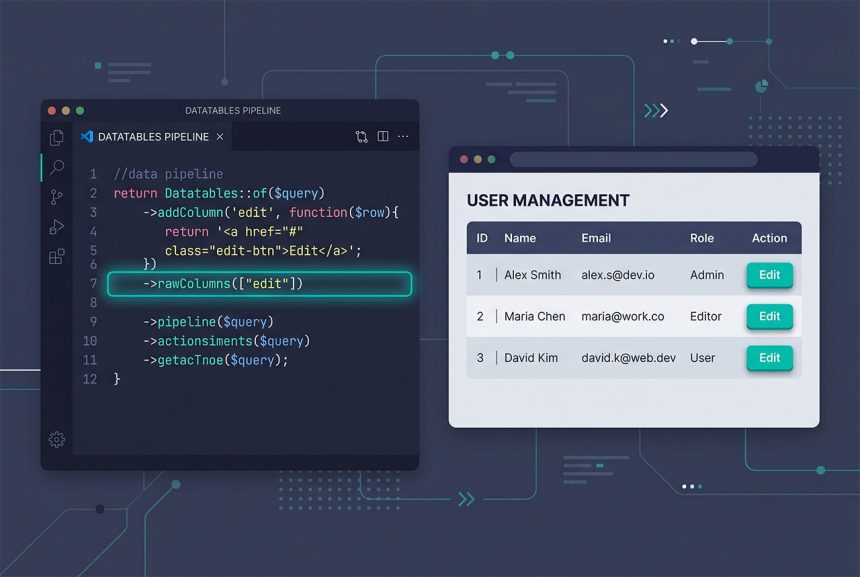
The laravel datatables html column renders as escaped text (<a href>) instead of a working link because Yajra’s DataTables server-side integration escapes every column by default. The fix is ->rawColumns(['column_name']), which whitelists specific columns to be emitted as raw HTML. This guide covers the one-line fix, when to add rawColumns versus render Blade inside the callback, and how to keep the escaping-off columns safe from XSS.
Last verified: 2026-04-23 on Laravel 11 with PHP 8.3 and yajra/laravel-datatables-oracle v11. Originally published 2023-03-30, rewritten and updated 2026-04-23.
TL;DR
After adding an HTML column with addColumn, chain ->rawColumns([...]) before ->make():
return Datatables::of($users)
    ->addColumn('edit', function ($row) {
        return '<a href="' . route('user.edit', $row->id) . '">Edit</a>';
    })
    ->rawColumns(['edit'])
    ->make(false);
Why the default escapes HTML
Yajra’s DataTables is a server-side responder: the client asks for a page of rows via AJAX, Laravel produces JSON with the row data, and the client renders it. Every column value in that JSON goes through HTML escaping before it’s sent, because the common case — a user’s name column, a description — contains untrusted text that could include <script> tags. Escaping by default is the right behavior for untrusted data.
But when you’ve built the HTML yourself inside an addColumn callback — an Edit link, a delete button, a status badge — escaping turns your tags into visible text: <a href="/users/10/edit">Edit</a> shows up literally in the table cell. rawColumns is the opt-out: “trust these specific columns as-is.”
The minimal fix
Add one line. The column name in rawColumns must match the name you passed to addColumn:
return Datatables::of($users)
    ->addColumn('edit', function ($row) {
        return '<a href="' . route('user.edit', $row->id) . '">Edit</a>';
    })
    ->rawColumns(['edit'])
    ->make(false);
Everything else — name, email, whatever database columns the table is showing — stays escaped. Only edit is emitted as raw HTML, and the browser renders the <a> tag properly.

Multiple HTML columns
Pass every column you want raw in the array — edit, delete, status badge, avatar:
return Datatables::of($users)
    ->addColumn('avatar', fn ($row) => '<img src="' . $row->avatar_url . '" class="avatar">')
    ->addColumn('status', fn ($row) => $row->active
        ? '<span class="badge bg-success">Active</span>'
        : '<span class="badge bg-secondary">Inactive</span>')
    ->addColumn('actions', fn ($row) => view('users._actions', compact('row'))->render())
    ->rawColumns(['avatar', 'status', 'actions'])
    ->make(false);
Forgetting to add a column to rawColumns is the most common reason one cell renders as escaped text while its neighbors look fine.
Keep XSS-safe inside a raw column
rawColumns turns off automatic escaping for the whole column, so any database value you interpolate into the HTML string is shipped verbatim. Wrap anything user-authored with Laravel’s e() helper:
->addColumn('name_link', function ($row) {
    return '<a href="' . route('user.show', $row->id) . '">'
        . e($row->name)              // user-supplied — escape it
        . '</a>';
})
->rawColumns(['name_link'])
e() is Laravel’s wrapper around htmlspecialchars with sane defaults (double-quote escape, UTF-8). Structural tags (<a>, <span>) stay as tags because you wrote them; the content you pulled from the database gets escaped before interpolation.
For larger HTML — render a Blade partial
Once the HTML inside a callback goes beyond a single tag, PHP string concatenation gets painful. Render a Blade view instead:
->addColumn('actions', function ($row) {
    return view('users._row_actions', ['row' => $row])->render();
})
->rawColumns(['actions'])
{{-- resources/views/users/_row_actions.blade.php --}}
<div class="btn-group">
<a href="{{ route('user.edit', $row->id) }}" class="btn btn-sm btn-primary">Edit</a>
<form method="POST" action="{{ route('user.destroy', $row->id) }}" class="d-inline">
@csrf
@method('DELETE')
<button class="btn btn-sm btn-danger">Delete</button>
</form>
</div>Blade’s {{ ... }} auto-escapes user content, so you get the XSS guard for free — no manual e() calls. This is the cleanest pattern once the action column has more than one button or any per-row conditional rendering.
Frequently asked questions
Because Yajra’s DataTables integration escapes every column’s output by default — a safety default that protects you from XSS when the column data came from the database. When you’ve built an HTML string yourself (an Edit button, a status badge, an icon), tell DataTables which columns you trust with ->rawColumns(['column_name']). Only those columns are emitted as raw HTML; everything else stays escaped.
rawColumns array? The same column names you used in addColumn or editColumn — the keys that the frontend sees. If you added an edit column and an actions column, call ->rawColumns(['edit', 'actions']). Existing database columns stay escaped unless you explicitly list them too.
rawColumns entry? Only if you’ve escaped the user-supplied parts yourself. The point of rawColumns is to opt out of automatic escaping, so any variable you interpolate is shipped verbatim to the browser. Use e($row->name) (Laravel’s htmlspecialchars wrapper) inside the callback around anything the user wrote, and only leave the structural HTML (<a>, <span class="badge">) unescaped.
make(false) or make(true)? make(false) does not mangle the raw columns; make(true) additionally runs PHP’s htmlentities on all remaining output, which is largely redundant because DataTables already escapes non-raw columns. Most current Yajra\DataTables code just calls ->make() with no argument — the library defaults are already the safer choice. Keep make(false) if you’re following an existing pattern in a codebase; there’s no gotcha.
Yes — render a Blade view inside the callback: return view('datatables.actions', ['row' => $row])->render(). Blade auto-escapes interpolations ({{ $row->name }}) while leaving tags alone, so you get safe concatenation without manually calling e(). This is cleaner than long PHP concatenation once the HTML grows beyond a single tag.
Related guides
- How to Search Custom or Composite Columns in Laravel DataTables — the sibling problem of search on columns
addColumnproduces. - How to Fix “Unknown column ‘CONCAT'” in Laravel — why building composite values needs
DB::raw. - How to Use Multiple where and orWhere in Laravel Eloquent — filtering the DataTable data source.
- How to Install Laravel on Ubuntu — a fresh project to add Yajra DataTables to.
References
Yajra\\DataTables docs (raw columns, escaping): yajrabox.com/docs/laravel-datatables.