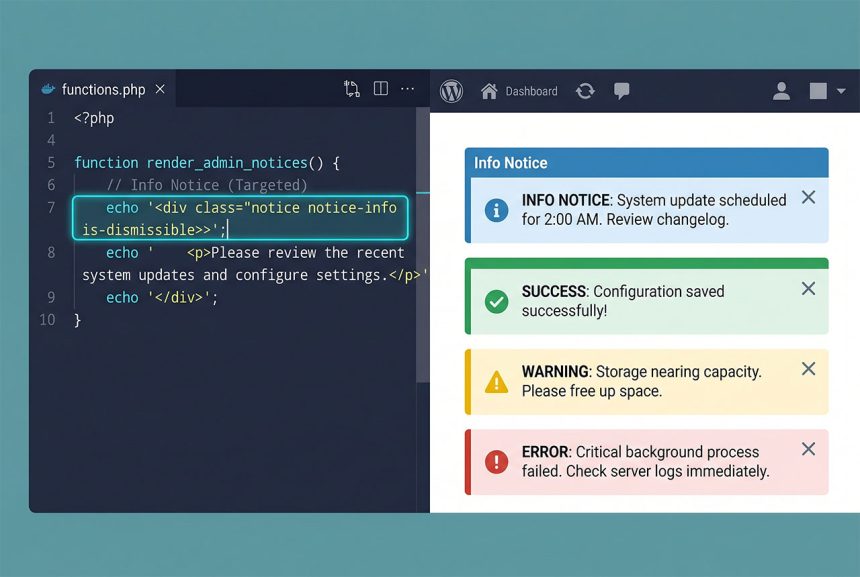
A wordpress admin notice — the coloured banner across the top of admin pages — is one hook (admin_notices) and a <div> with the right class. Four message types (info, success, warning, error) pick the colour, and is-dismissible adds the X button. This guide covers the minimal snippet, scoping it to specific screens, safe escaping, and the “show once and remember” pattern.
Last verified: 2026-04-23 on WordPress 6.5 and PHP 8.3. Originally published 2023-05-22, rewritten and updated 2026-04-23.
TL;DR
add_action( 'admin_notices', 'how7o_show_admin_notice' );

function how7o_show_admin_notice() {
    $type = 'info';  // info | success | warning | error
    printf(
        '<div class="notice notice-%s is-dismissible"><p>%s</p></div>',
        esc_attr( $type ),
        esc_html__( 'Hello World!', 'how7o' )
    );
}
The four notice types
<div class="notice notice-info is-dismissible"><p>Blue — purely informational</p></div>
<div class="notice notice-success is-dismissible"><p>Green — action completed</p></div>
<div class="notice notice-warning is-dismissible"><p>Yellow — attention needed</p></div>
<div class="notice notice-error is-dismissible"><p>Red — something failed</p></div>
The class combinations are:
notice notice-info— informational (blue).notice notice-success— success (green).notice notice-warning— warning (yellow).notice notice-error— error (red).is-dismissible— adds the “×” close button. Omit for permanent notices.
Scoping to specific screens
add_action( 'admin_notices', function () {
    $screen = get_current_screen();

    // Only on the "All Posts" screen
    if ( ! $screen || $screen->id !== 'edit-post' ) {
        return;
    }

    echo '<div class="notice notice-info is-dismissible"><p>Heads up — new editor features rolling out.</p></div>';
} );
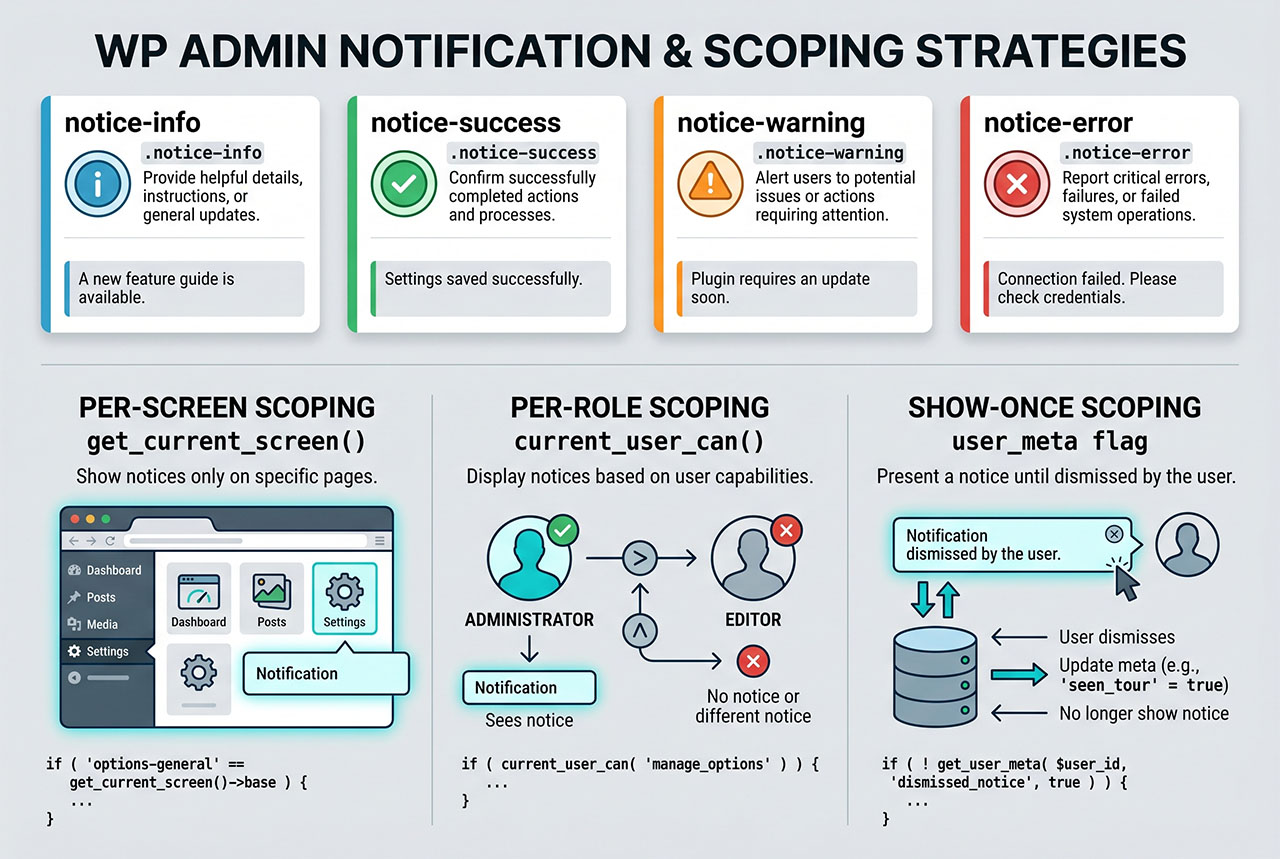
Without a scope check the notice renders on every admin page — noisy and quickly ignored. Common $screen->id values: dashboard, edit-post, edit-page, upload, options-general, plugins, themes. Print get_current_screen() once to discover the ID of wherever you want the notice.
Scoping to specific roles
add_action( 'admin_notices', function () {
    if ( ! current_user_can( 'manage_options' ) ) {
        return;  // admins only
    }

    echo '<div class="notice notice-warning"><p>Backup ran 9 days ago — due for a refresh.</p></div>';
} );
A notice for admins only shouldn’t appear for editors or authors. current_user_can('manage_options') is the typical admin capability check; swap for edit_posts or a custom capability when the audience is broader.
Show once per user
add_action( 'admin_notices', function () {
    $user_id  = get_current_user_id();
    $meta_key = 'how7o_seen_welcome_notice';

    if ( get_user_meta( $user_id, $meta_key, true ) ) {
        return;
    }

    echo '<div class="notice notice-info is-dismissible"><p>Welcome to the new dashboard!</p></div>';

    update_user_meta( $user_id, $meta_key, 1 );
} );
Stores a user-meta flag once the notice renders. Subsequent visits see the flag and skip the notice. For a proper “Dismiss permanently” button (the X cleared but on reload it’s back), wire a JS handler to an admin-ajax endpoint that updates the user meta when clicked.
Frequently asked questions
Hook admin_notices, echo a <div class="notice notice-{type} is-dismissible"><p>Message</p></div>. {type} is one of info, success, warning, error — WordPress styles each with the usual blue/green/yellow/red accent. is-dismissible adds the X-to-close button.
network_admin_notices instead? On WordPress Multisite, admin_notices fires on the per-site admin; network_admin_notices fires on the Network Admin screens (/wp-admin/network/). If your notice applies to the network owner (a license expiring, a network-wide update), use the network hook. For per-site notices, stick with admin_notices.
Check get_current_screen() inside the callback: $screen = get_current_screen(); if ($screen->id === 'edit-post') { echo '<div ...'; }. The id property tells you which screen the admin is on (dashboard, edit-post, options-general, etc.). Without a scope check the notice appears on every admin page.
Yes — use esc_html() for plain text, wp_kses_post() for a message that needs a limited set of HTML tags. echo '<p>Hello</p>' with user-generated text interpolated raw is an XSS vulnerability; echo '<p>' . esc_html($message) . '</p>' is safe. The class attribute (notice-{type}) also needs esc_attr() if $type comes from untrusted input.
Store a user meta flag after showing it and check the flag before echoing: if (!get_user_meta($user_id, 'seen_notice_x', true)) { echo '<div ...'; update_user_meta($user_id, 'seen_notice_x', 1); }. For the “Dismiss permanently” button, wire an admin_enqueue_scripts-loaded JS that calls an AJAX handler to set the meta on click.
Related guides
- How to Display Different Menus to Logged-In Users in WordPress — another UI swap, user-state driven.
- How to Check If a User Is Logged In in WordPress — capability checks in detail.
- How to Schedule a Cron Job in WordPress Without a Plugin — pair a cron with an admin notice for operational output.
- How to Disable Revisions and Autosave in WordPress — other admin-area customizations.
References
WordPress developer reference for admin_notices and the Notices UI: developer.wordpress.org/reference/hooks/admin_notices.