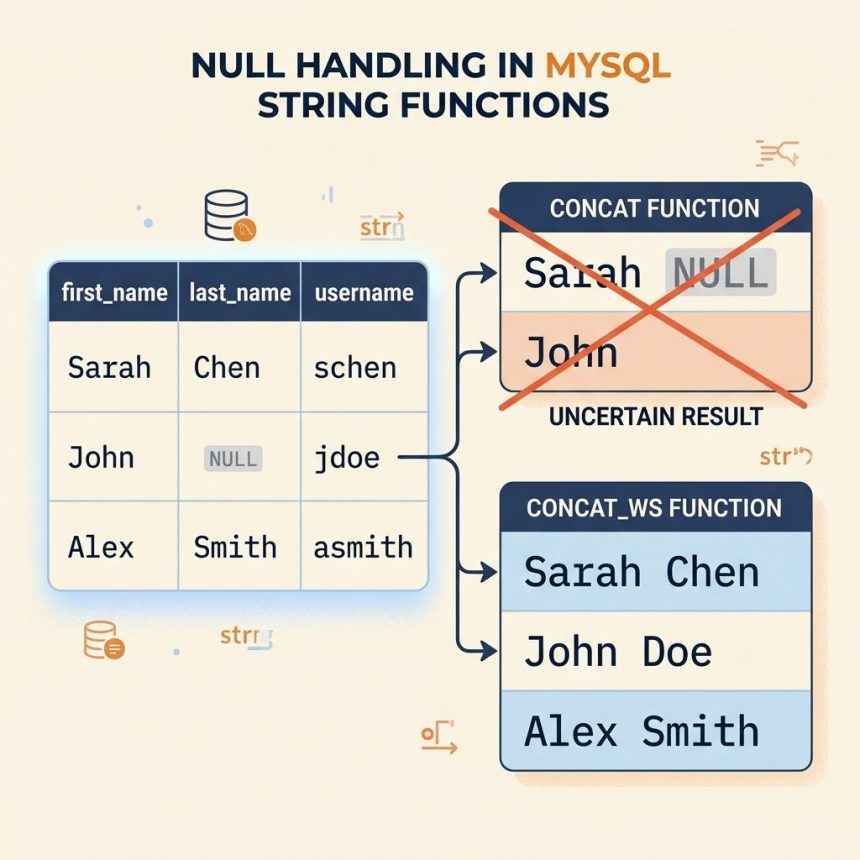
To handle MySQL’s CONCAT() returning NULL when any input is NULL, either wrap each potentially-NULL column with COALESCE(col, ''), or switch to CONCAT_WS(), which silently skips NULL arguments.
Last verified: 2026-05-17 on MySQL 8.0 and MariaDB 10.11. Originally published 2024-03-28, rewritten and updated 2026-05-17.
The problem
SELECT CONCAT(first_name, ' ', last_name, ' (', username, ')')
FROM users;

-- For a user with last_name = NULL, the whole expression is NULL.
MySQL’s CONCAT() follows the SQL standard: any NULL argument poisons the entire result. That’s right for arithmetic but not for assembling display names.

Fix 1 — wrap nullables in COALESCE()
SELECT CONCAT(
    COALESCE(first_name, ''),
    ' ',
    COALESCE(last_name, ''),
    ' (',
    username,
    ')'
)
FROM users;
COALESCE(field, '') returns the field if it’s not NULL, otherwise an empty string. Wrap every column that could be NULL. Verbose, but explicit — you can see exactly which fields are nullable from the SQL.
Fix 2 — CONCAT_WS() skips NULL automatically
SELECT CONCAT_WS('', first_name, ' ', last_name, ' (', username, ')')
FROM users;
CONCAT_WS() (“CONCAT With Separator”) was built to skip NULL arguments. The first argument is the separator; the rest are the values to join. Using an empty separator '' makes it behave like CONCAT() for non-NULL inputs while silently dropping NULLs.
Better use of CONCAT_WS() — let it provide the spaces
-- Separator = single space, NULLs skipped, no leading/trailing space if NULL is at the edge
SELECT CONCAT_WS(' ', first_name, last_name) AS full_name
FROM users;

-- For users with NULL last_name -> just "John"
-- For users with NULL first_name -> just "Doe"
-- For both NULL                  -> "" (empty string, not NULL)
When the separator is a real character (space, comma, etc.), CONCAT_WS() shines: it doesn’t double-up the separator around NULL values, so you don’t get “John Doe” with a double space when one side is missing.
Frequently asked questions
CONCAT() return NULL when any argument is NULL? It’s the SQL standard’s three-valued logic — any operation involving NULL produces NULL, on the principle that NULL means “unknown” and combining anything with an unknown is itself unknown. CONCAT('a', NULL, 'b') isn’t ‘aNULLb’ or ‘ab’ by default; it’s NULL. CONCAT_WS() deliberately breaks this rule, because building display names from optional fields is the common case where NULL-as-skip is what you want.
COALESCE() and IFNULL()? IFNULL(a, b) takes exactly two arguments — return a if not NULL, else b. COALESCE(a, b, c, …) takes any number — returns the first non-NULL. COALESCE is SQL-standard and portable to PostgreSQL/SQL Server; IFNULL is MySQL/MariaDB-only. For a CONCAT replacement, COALESCE(field, '') reads cleanly.
CONCAT_WS with an empty separator behave exactly like CONCAT? Almost — both produce the same string for non-NULL inputs. The difference is NULL handling: CONCAT_WS('', 'a', NULL, 'b') returns 'ab'; CONCAT('a', NULL, 'b') returns NULL. Performance is identical; pick by readability and NULL-tolerance needs.
PostgreSQL has CONCAT() (NULL-tolerant — opposite default from MySQL) and CONCAT_WS() (also NULL-tolerant). Counter-intuitive when you switch databases. To get MySQL-style strict CONCAT in PostgreSQL, use the || operator, which does return NULL when any operand is NULL.
Related guides
- How to Combine Multiple Columns as One String in MySQL
- How to Get Only the Digits from a String in MySQL
- How to Remove a Specific String from a Column in MySQL
References
MySQL CONCAT(): dev.mysql.com/doc/refman/8.0/en/string-functions.html#function_concat. MySQL CONCAT_WS(): dev.mysql.com/doc/refman/8.0/en/string-functions.html#function_concat-ws. MySQL COALESCE(): dev.mysql.com/doc/refman/8.0/en/comparison-operators.html#function_coalesce.