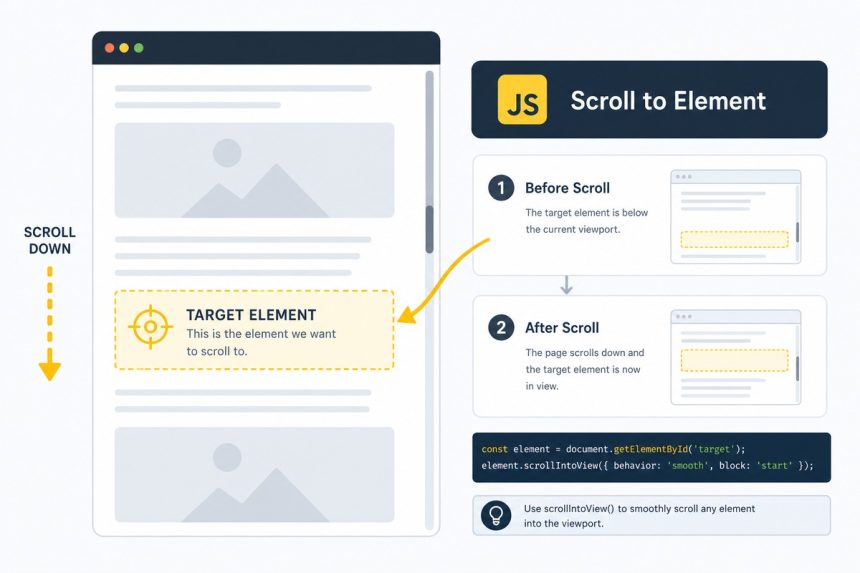
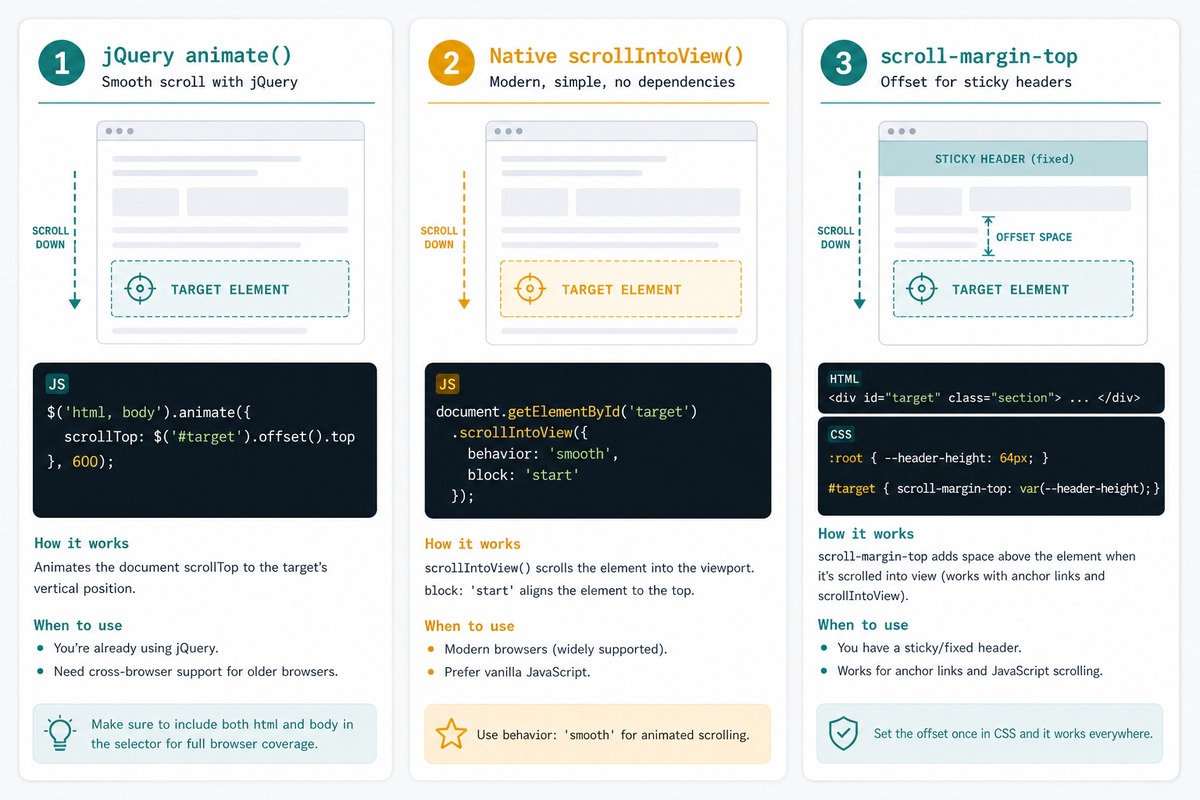
To scroll to an element using jQuery, animate the scrollTop of html and body to the target element’s offset: $('html, body').animate({ scrollTop: $('#target').offset().top }, 500). The 500 is the animation duration in milliseconds.
Last verified: 2026-05-17 with jQuery 3.7. Originally published 2023-01-23, rewritten and updated 2026-05-17.
The jQuery one-liner
$('button').on('click', function () {
    $('html, body').animate(
        { scrollTop: $('#element-id').offset().top },
        500
    );
});
.offset().top returns the element’s y-position relative to the document. .animate({ scrollTop: y }, duration) animates the scroll-bar position to that y-coordinate over the given duration.
Both html and body — why the dual selector
// Same effect, alternative form
$([document.documentElement, document.body]).animate(
    { scrollTop: $('#element-id').offset().top },
    500
);
Different browsers historically scrolled the document via different elements. Targeting both html (documentElement) and body covers every browser without sniffing. Modern browsers have converged but the dual selector is cheap insurance.
With a fixed-header offset
const headerHeight = $('#site-header').outerHeight();

$('html, body').animate(
    { scrollTop: $('#element-id').offset().top - headerHeight - 16 },
    500
);
Subtracting the header height (plus a little breathing room) prevents the target from disappearing under a sticky navigation bar. Read the header height with outerHeight() instead of hardcoding it — it survives theme changes and responsive breakpoints.
Native equivalent — scrollIntoView
document.getElementById('element-id').scrollIntoView({
    behavior: 'smooth',
    block:    'start',
});
Native, supported in every modern browser, hardware-accelerated, no library needed. For sticky-header offsets, set this in CSS on the target:
#element-id {
    scroll-margin-top: 80px;   /* matches your sticky header height */
}
The browser then scrolls so the target sits 80 px from the top — clean separation of behavior and presentation.
Scroll a container, not the page
// Scroll a scrollable div, not the window
const $container = $('#scroll-container');
const $target    = $('#item-42');

$container.animate({
    scrollTop: $target.offset().top - $container.offset().top + $container.scrollTop(),
}, 500);
For a scrollable container instead of the page, animate that container’s scrollTop. The arithmetic accounts for the container’s own position on the page and its current scroll offset.
Frequently asked questions
html and body? Different browsers historically tracked scroll on different roots: Chrome/Safari read the scroll position from body, Firefox/Edge from html. Targeting both ensures the animation works everywhere. Modern browsers have converged (it’s document.scrollingElement on all of them now), but the dual selector keeps backward compatibility cheap.
scrollIntoView? For new code, native: document.getElementById('target').scrollIntoView({ behavior: 'smooth', block: 'start' }). One line, no library, hardware-accelerated. Use jQuery when you’re already in a jQuery codebase or need control over the easing function and duration that scrollIntoView doesn’t give you.
Subtract the header’s height from the target’s offset: $('html, body').animate({ scrollTop: $('#target').offset().top - 80 }, 500). Hardcoding 80 is brittle; read the header’s actual height with $('#header').outerHeight() instead. For native scrollIntoView, set scroll-margin-top in CSS on the target instead — cleanest solution.
scrollTop and scrollTo? scrollTop is the y-position of the scroll bar (read/write). window.scrollTo({ top, behavior }) is the native API that animates if you ask for behavior: 'smooth'. jQuery’s .animate({ scrollTop: y }) writes to the property over time, simulating smooth scroll. Native scrollTo with 'smooth' is now widely supported and uses the browser’s own implementation.
Related guides
- How to Check if an Element Is Visible or Hidden with jQuery
- How to Get the Index in a jQuery .each() Loop
- How to Check if a Checkbox Is Checked with jQuery
References
jQuery .animate(): api.jquery.com/animate. MDN Element.scrollIntoView(): developer.mozilla.org/en-US/docs/Web/API/Element/scrollIntoView. CSS scroll-margin-top: developer.mozilla.org/en-US/docs/Web/CSS/scroll-margin-top.