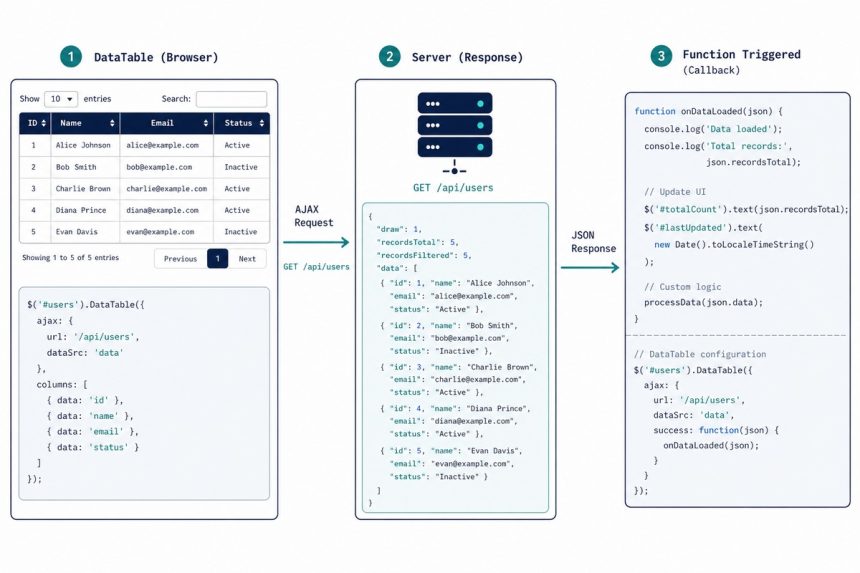
To run a function every time DataTables finishes loading data via Ajax, listen for the xhr.dt event on the table element. The event fires once per Ajax request and gives you the raw server response, so you can react to load completion or inspect what came back.
Last verified: 2026-05-17 with DataTables 2.0. Originally published 2024-03-21, rewritten and updated 2026-05-17.
The xhr.dt event
$('#data-table')
    .on('xhr.dt', function (e, settings, json, xhr) {
        console.log('Ajax load complete', json);
        // your post-load logic
    })
    .DataTable({
        ajax: '/api/employees',
        columns: [ /* ... */ ],
    });
Bind the handler before calling .DataTable() — DataTables fires xhr.dt internally during initialisation, so a handler added afterwards misses the very first request.
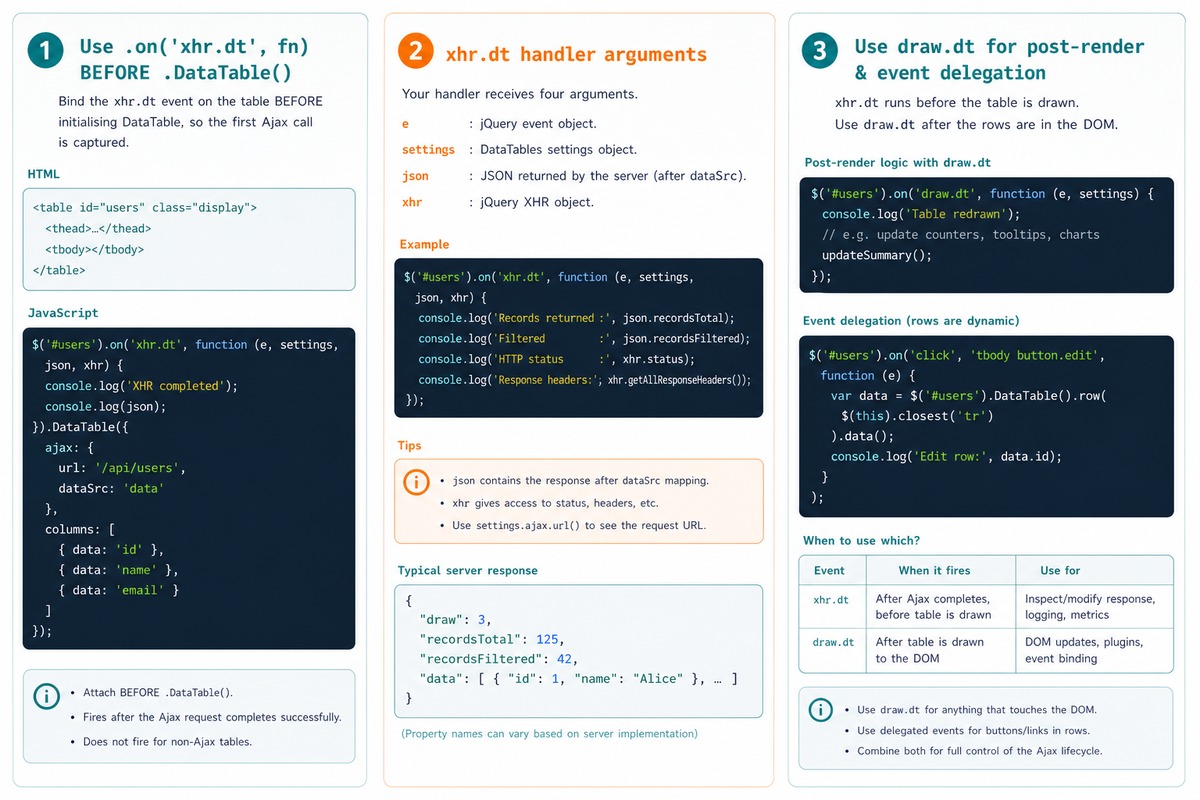
Handler arguments
e— the jQuery event object.settings— DataTables’ internal settings for this instance. Rarely needed; useful for debugging.json— the raw server response. Mutating it here changes what DataTables ingests, becausexhr.dtfires before the rows are parsed.xhr— the underlying jQuery XHR object. Hasstatus,responseText, etc.
Post-render — use draw.dt instead
$('#data-table')
    .on('draw.dt', function () {
        // Runs after rows are rendered, including on pagination/sort/search
        $('#data-table tbody tr').hover(/* ... */);
    })
    .DataTable({ ajax: '/api/employees', columns: [/* ... */] });
xhr.dt fires on Ajax response. draw.dt fires every redraw (Ajax response + pagination + sort + search). Use draw.dt when you need to manipulate the rendered DOM; use xhr.dt when you only care about Ajax responses.
Reshape a third-party response inside xhr.dt
$('#data-table')
    .on('xhr.dt', function (e, settings, json) {
        // Server returns { items: [...] }, DataTables expects { data: [...] }
        if (json && json.items) {
            json.data = json.items;
        }
    })
    .DataTable({ ajax: '/external/api' });
Because xhr.dt fires before DataTables parses the response, you can rewrite the JSON in place — useful when the endpoint shape doesn’t match DataTables’ expected format and you can’t change the server.
Bind events to the rendered rows
// Event delegation — listener on the static , matches rows that appear later
$('#data-table tbody').on('click', '.edit-link', function () {
const data = $('#data-table').DataTable().row( $(this).closest('tr') ).data();
console.log('clicked row', data);
});
Avoid binding handlers in draw.dt on a per-row basis — you’ll add the same handler multiple times. Use delegated handlers on a static parent (the <tbody>) so a single listener handles every row across redraws.
Frequently asked questions
What’s the difference between xhr.dt and draw.dt? xhr.dt fires only on Ajax responses — once per network request, before the table actually renders the new rows. draw.dt fires every time the table redraws, which includes Ajax loads and pagination/sort/search interactions. If you want a post-render hook that runs after every visible change, draw.dt is the broader choice.
Why bind the event before calling .DataTable()? DataTables fires xhr.dt internally on initialisation when ajax is set, so handlers attached after .DataTable() miss the first event. Binding to the underlying <table> element before the init call ensures you catch every Ajax response including the first.
Is the json argument the raw server response? Yes — exactly what the server returned. You can inspect json.recordsTotal, json.data, or any custom fields you’ve added. Modifying json here also affects what DataTables ingests, because the event fires before the table reads the response. Useful for response massaging — e.g. reshaping a third-party API into the DataTables format.
How do I attach event handlers to the newly rendered rows? Use draw.dt (fires after rendering) or, more efficiently, delegate from a parent: $('#data-table tbody').on('click', '.row-action', handler). Delegated handlers survive pagination, redraws, and re-renders because the listener lives on the parent, not on the per-row elements.
Related guides
- How to Load Data in DataTables Using Ajax
- How to Reload DataTables with a New Ajax URL
- How to Create Ajax-Based Pagination in DataTables
References
DataTables xhr.dt event: datatables.net/reference/event/xhr. DataTables draw.dt event: datatables.net/reference/event/draw.