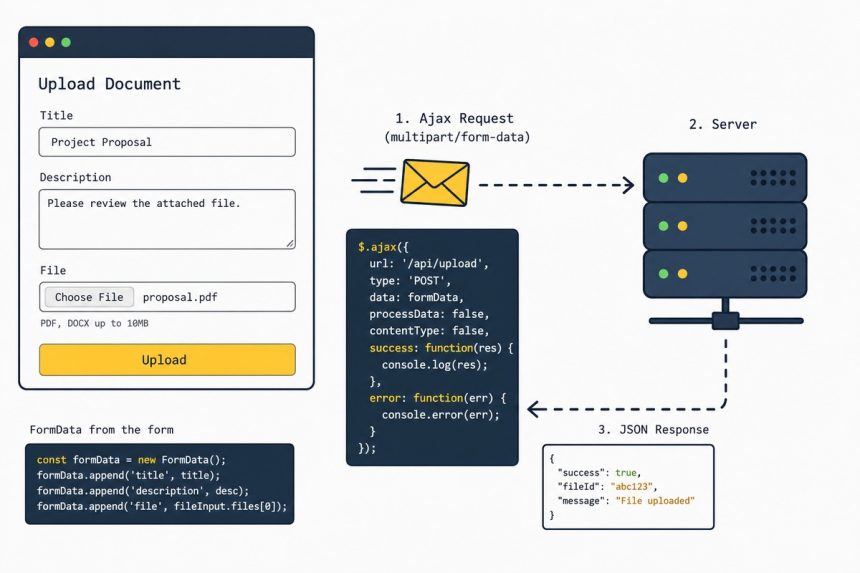
To upload image (or any) files via Ajax with jQuery, wrap the form in new FormData(this) and pass that to $.ajax with contentType: false and processData: false. The .serialize() approach silently drops file inputs — FormData is what carries multipart payloads.
Last verified: 2026-05-17 with jQuery 3.7. Originally published 2022-09-21, rewritten and updated 2026-05-17.
The fix — use FormData
<form id="user-signup-form" enctype="multipart/form-data" action="/upload" method="post">
    <input type="text"     name="username">
    <input type="email"    name="email">
    <input type="password" name="password">
    <input type="file"     name="profile_picture" accept="image/*">
    <button type="submit">Register</button>
</form>

<script>
$('#user-signup-form').on('submit', function (e) {
    e.preventDefault();

    const formData = new FormData(this);

    $.ajax({
        type:        'POST',
        url:         $(this).attr('action'),
        data:        formData,
        cache:       false,
        contentType: false,
        processData: false,
    })
    .done(function (data) {
        console.log('Uploaded:', data);
    })
    .fail(function (xhr) {
        console.error('Upload failed:', xhr.statusText);
    });
});
</script>
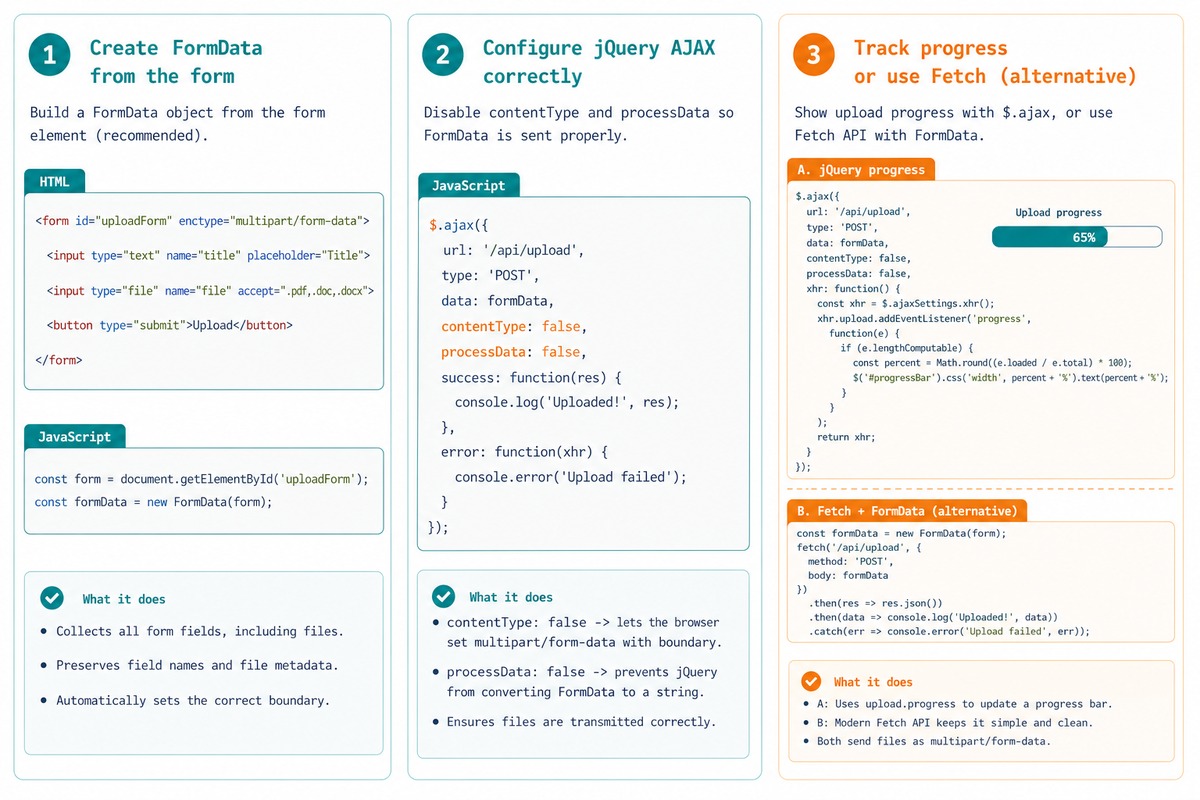
new FormData(this) walks the form and grabs every field, including the file. contentType: false lets the browser set the multipart boundary; processData: false stops jQuery from URL-encoding the binary data.
Server side (PHP)
<?php
// /upload — receives the multipart POST
if (isset($_FILES['profile_picture'])) {
    $file = $_FILES['profile_picture'];
    if ($file['error'] === UPLOAD_ERR_OK) {
        move_uploaded_file($file['tmp_name'], 'uploads/' . basename($file['name']));
        echo json_encode(['ok' => true]);
        exit;
    }
}
http_response_code(400);
echo json_encode(['ok' => false]);
Show upload progress
$.ajax({
    type:        'POST',
    url:         '/upload',
    data:        formData,
    cache:       false,
    contentType: false,
    processData: false,
    xhr: function () {
        const xhr = new window.XMLHttpRequest();
        xhr.upload.addEventListener('progress', function (e) {
            if (e.lengthComputable) {
                const pct = Math.round((e.loaded / e.total) * 100);
                $('#progress').text(pct + '%');
            }
        });
        return xhr;
    },
});
Vanilla fetch alternative
document.getElementById('user-signup-form').addEventListener('submit', async (e) => {
    e.preventDefault();

    const res = await fetch(e.target.action, {
        method: 'POST',
        body:   new FormData(e.target),
    });

    const data = await res.json();
    console.log(data);
});
fetch with a FormData body is one line — no contentType/processData gymnastics needed. For new code without jQuery, this is the cleanest form.
Frequently asked questions
$(form).serialize() lose file inputs? .serialize() only handles successful form controls that have string values — text, select, checkbox, etc. <input type="file"> values are File objects, not strings. FormData(form) walks the form and grabs every field including files, then jQuery’s $.ajax sends it as a multipart request the same way a non-Ajax submit would.
contentType: false and processData: false? contentType: false tells jQuery not to set the Content-Type header — the browser sets it to multipart/form-data; boundary=... with a generated boundary string. processData: false tells jQuery not to URL-encode the data (it would default to application/x-www-form-urlencoded, which can’t carry binary file content). Both are required for file uploads.
Override the XHR via xhr: xhr: function () { const x = new window.XMLHttpRequest(); x.upload.addEventListener('progress', e => { if (e.lengthComputable) console.log(e.loaded / e.total); }); return x; }. The progress event fires while bytes are uploading; the percentage is loaded / total.
fetch? For new code, fetch: fetch(url, { method: 'POST', body: new FormData(form) }) is one line and doesn’t need the contentType/processData dance — fetch respects FormData natively. Use jQuery only when you’re already in a jQuery codebase.
Related guides
- How to Upload Only Image Files Using PHP
- How to Open a File Dialog When Clicking a Button
- How to Convert an Image to a Base64 String in JavaScript
References
jQuery $.ajax: api.jquery.com/jquery.ajax. MDN FormData: developer.mozilla.org/en-US/docs/Web/API/FormData. MDN XMLHttpRequest.upload: developer.mozilla.org/en-US/docs/Web/API/XMLHttpRequest/upload.