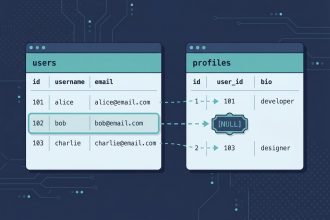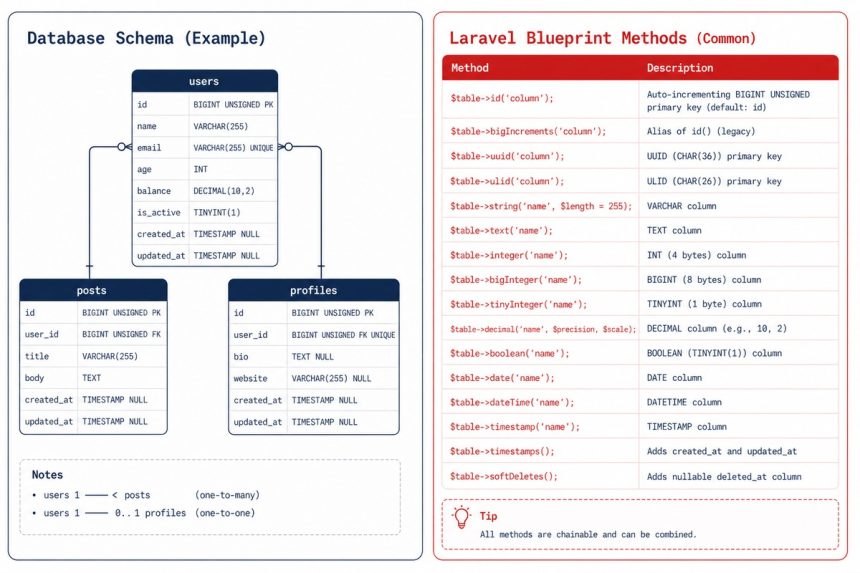
Laravel’s schema builder lets you declare column types with a fluent API. Below is a reference cheat sheet of the most-used methods on the Blueprint object — what they create, when to use them, and the modifiers (nullable, default, unsigned) that apply to most types.
Last verified: 2026-05-17 on Laravel 11. Originally published 2022-09-11, rewritten and updated 2026-05-17.
IDs and timestamps
$table->id();                       // unsigned BIGINT auto-increment primary key, named "id"
$table->bigIncrements('id');        // explicit form of id()
$table->increments('id');           // unsigned INT auto-increment primary key
$table->uuid('id')->primary();      // UUID primary key

$table->timestamps();               // adds created_at + updated_at (TIMESTAMP)
$table->timestampsTz();             // TIMESTAMP WITH TIME ZONE (PostgreSQL-aware)
$table->nullableTimestamps();       // same as timestamps(), but nullable
$table->softDeletes();              // adds deleted_at (nullable TIMESTAMP) for soft deletes
$table->rememberToken();            // adds remember_token VARCHAR(100) NULL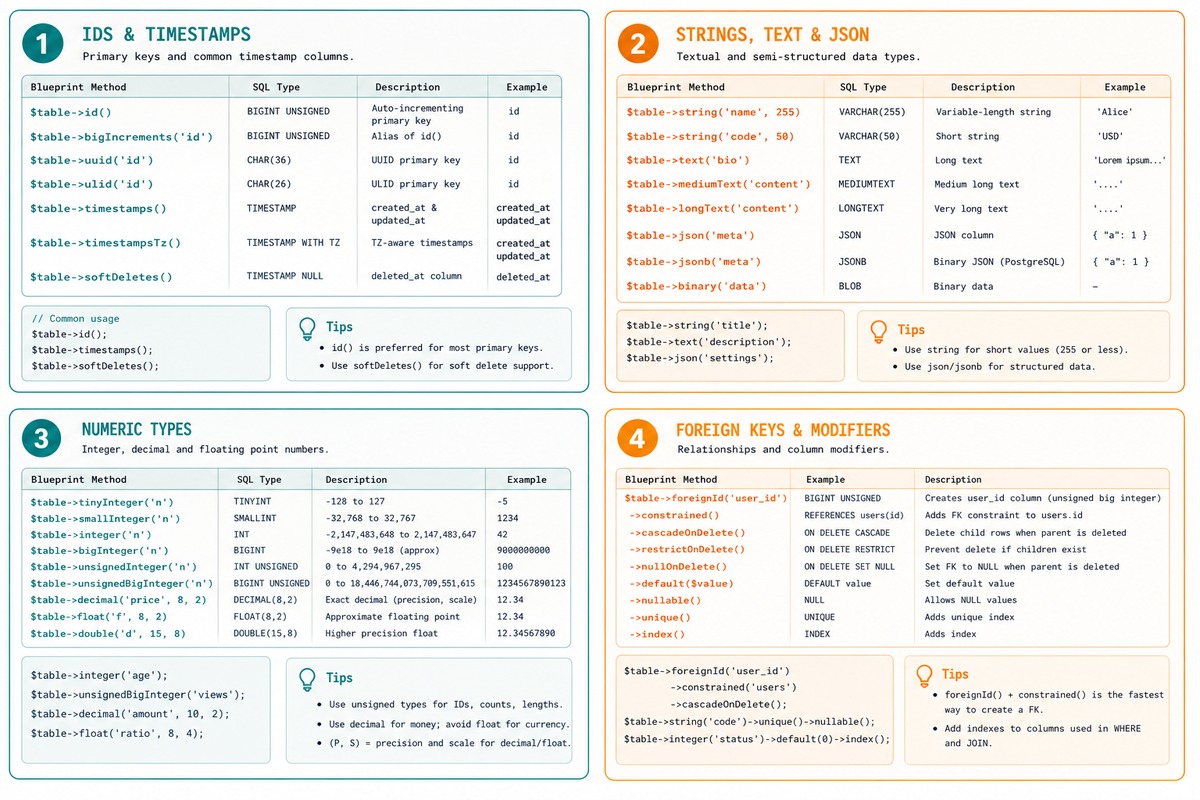
Strings and text
$table->string('email');            // VARCHAR(255)
$table->string('name', 100);        // VARCHAR(100)
$table->char('code', 4);            // CHAR(4) — fixed-length

$table->text('body');               // TEXT — up to 64 KB
$table->mediumText('body');         // MEDIUMTEXT — up to 16 MB
$table->longText('body');           // LONGTEXT — up to 4 GB

$table->json('payload');            // JSON column (MySQL 5.7+, MariaDB 10.2+, PostgreSQL)
$table->jsonb('payload');           // JSONB — PostgreSQL only, indexed
Numbers
$table->integer('votes');           // INTEGER
$table->bigInteger('votes');        // BIGINT
$table->smallInteger('votes');      // SMALLINT
$table->tinyInteger('votes');       // TINYINT
$table->mediumInteger('count');     // MEDIUMINT

$table->unsignedBigInteger('uid');  // BIGINT UNSIGNED
$table->unsignedInteger('count');   // INT UNSIGNED

$table->decimal('amount', 10, 2);   // DECIMAL(10,2) — money, exact
$table->float('rate');              // FLOAT — approximate
$table->double('coord', 15, 8);     // DOUBLE — high-precision approximate
For money, use decimal — floats accumulate rounding errors. For coordinates and physics, double with high precision.
Dates and times
$table->date('birthday');           // DATE
$table->dateTime('starts_at');      // DATETIME
$table->time('opens_at');           // TIME
$table->timestamp('confirmed_at');  // TIMESTAMP
$table->year('graduated');          // YEAR (MySQL-specific)
Booleans, enums, binary
$table->boolean('is_active');                 // TINYINT(1) on MySQL, native BOOLEAN on PG
$table->enum('status', ['draft', 'live']);    // ENUM — MySQL-specific; consider check constraints instead
$table->binary('data');                       // BLOB
Foreign keys (modern form)
// Recommended — single line
$table->foreignId('user_id')->constrained();

// With ON DELETE cascade
$table->foreignId('post_id')
    ->constrained()
    ->cascadeOnDelete();

// Pointing at a non-conventional column
$table->foreignUuid('account_id')
    ->constrained('accounts', 'uuid')
    ->cascadeOnDelete();

// Polymorphic
$table->morphs('taggable');             // adds taggable_id (BIGINT) + taggable_type (VARCHAR)
$table->nullableMorphs('taggable');     // same, but both nullable
Column modifiers
$table->string('email')->nullable();          // allow NULL
$table->integer('count')->default(0);         // default value
$table->integer('age')->unsigned();           // no negative values
$table->string('slug')->unique();             // UNIQUE constraint
$table->string('email')->index();             // index for searching
$table->text('summary')->after('title');      // place after a specific column (MySQL)
$table->string('note')->comment('Internal'); // attach a column comment
Modifiers chain on any column declaration. For schema changes, $table->string('email')->nullable()->change() alters an existing column.
Frequently asked questions
id() or bigIncrements('id')? Same column. $table->id() (Laravel 7+) is the modern shortcut — it creates an auto-incrementing unsigned BIGINT primary key named id. bigIncrements('id') is the explicit form. Either works on every modern Laravel; id() reads cleaner.
foreignId() instead of unsignedBigInteger? $table->foreignId('user_id')->constrained() creates the column and the foreign key constraint in one go. Compared to the old pattern of unsignedBigInteger('user_id') followed by foreign('user_id')->references('id')->on('users'), it’s three lines shorter and reads cleanly. Use it for new code; the old form still works.
timestamps() and timestampsTz()? timestamps() creates created_at and updated_at as TIMESTAMP columns (UTC seconds since epoch on MySQL). timestampsTz() uses TIMESTAMP WITH TIME ZONE — supported on PostgreSQL, treated as plain timestamp on MySQL. For multi-region apps where you store local times explicitly, use timestampsTz(). For UTC-everywhere apps, the plain version is fine.
tinyInteger, smallInteger, etc. worth the column-size optimization? On disk yes, in practice rarely. The size difference matters when a column holds billions of rows; under millions, the gain is invisible. Pick the type that matches the value range, not the smallest possible — clarity beats premature optimization. For booleans, boolean() generates the right tiny column for your database.
Related guides
- How to Add Foreign Keys in Laravel Migration
- How to Add New Columns to an Existing Table in Laravel Migration
- How to Change a MySQL Column Data Type Using Migration in Laravel
References
Laravel migrations — column types: laravel.com/docs/migrations#available-column-types. Foreign-key constraints: laravel.com/docs/migrations#foreign-key-constraints.