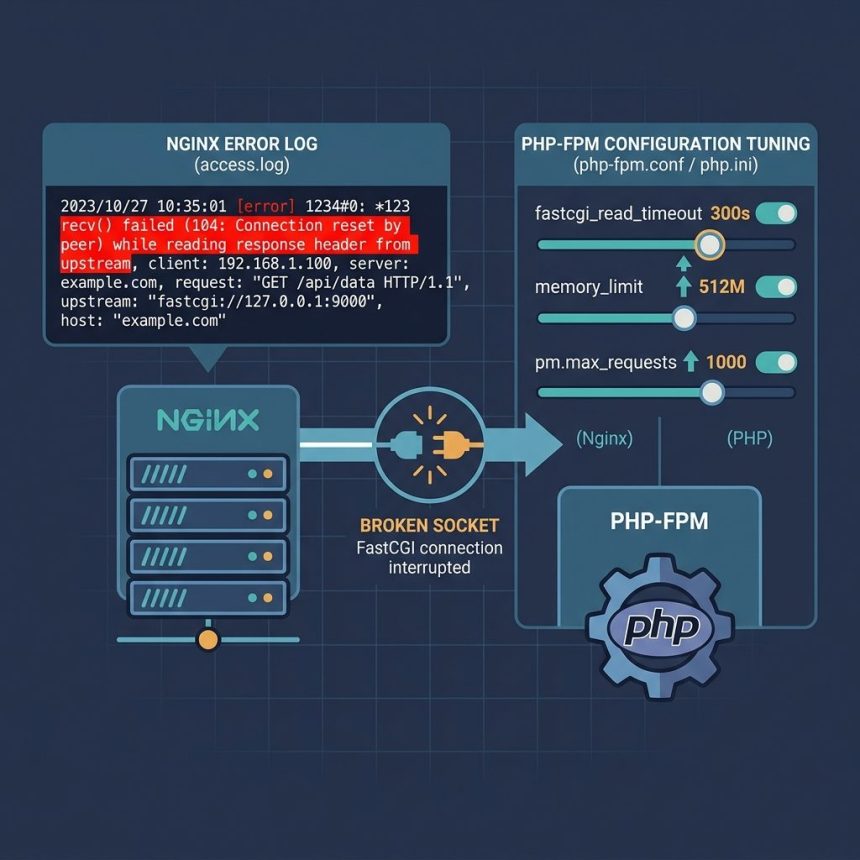
The Nginx error recv() failed (104: Connection reset by peer) means PHP-FPM (your FastCGI upstream) hung up on Nginx mid-response. The visitor sees a 502 Bad Gateway. This isn’t really an Nginx problem — Nginx is just reporting that the upstream went away — so the fix lives on the PHP-FPM side: memory, timeouts, worker recycling, and (occasionally) buffer sizes. This guide walks through the seven settings that fix this 95% of the time, in the order I’d touch them.
- TL;DR
- Why this error happens
- 1. Restart PHP-FPM first
- 2. Raise PHP memory_limit
- 3. Raise max_execution_time
- 4. Raise Nginx FastCGI timeouts
- 5. Align keepalive_requests with pm.max_requests
- 6. Raise the socket timeout (for downloads/uploads)
- 7. Increase output buffering (rarely needed)
- When none of those work
- Frequently asked questions
- Related guides
- References
Last verified: 2026-05-17 on Nginx 1.24+ and PHP 8.2/8.3 FPM. Originally published 2023-02-13, rewritten and updated 2026-05-17.
TL;DR
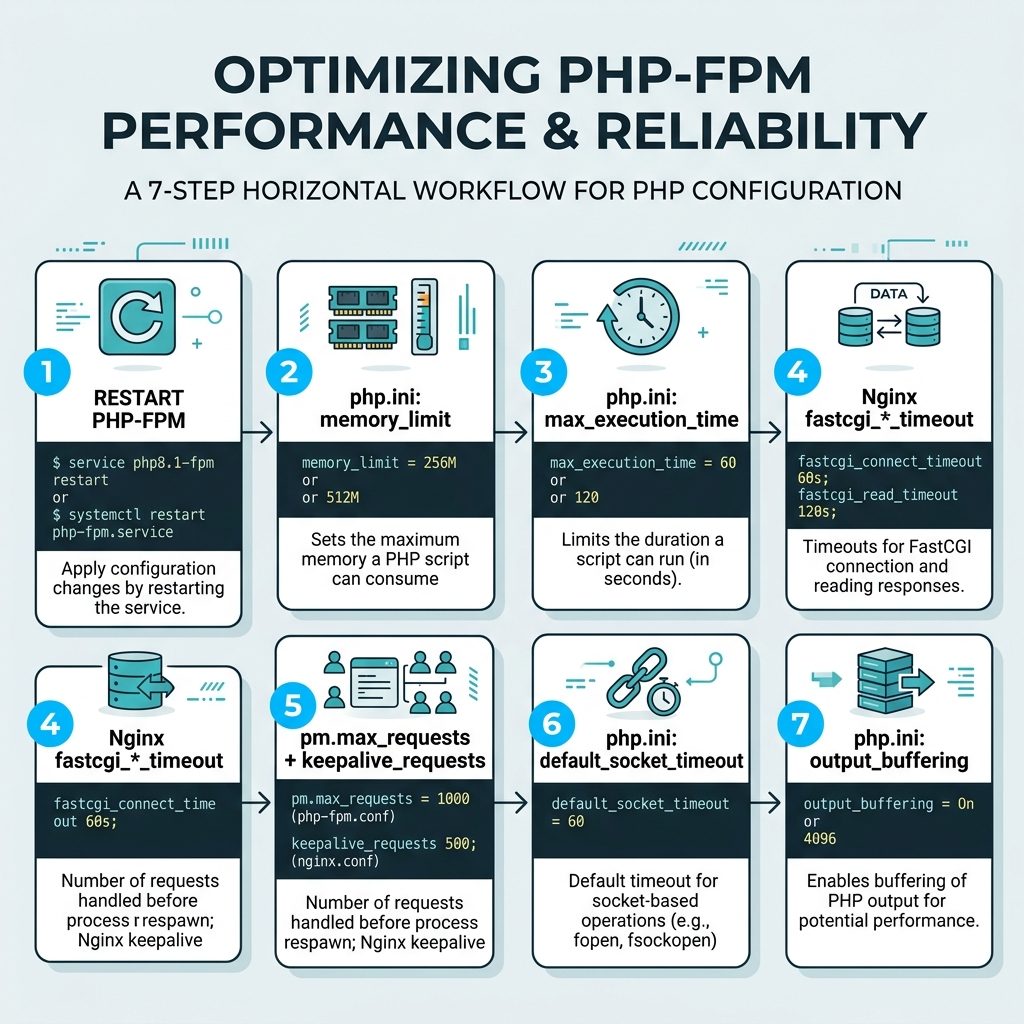
Restart PHP-FPM, raise its memory limit and execution time, raise Nginx’s FastCGI timeouts to match, and align keepalive_requests with PHP-FPM’s pm.max_requests. Sample values:
# /etc/php/8.3/fpm/php.ini
memory_limit = 512M
max_execution_time = 300
default_socket_timeout = 300
output_buffering = 65535

# /etc/php/8.3/fpm/pool.d/www.conf
pm.max_requests = 600

# /etc/nginx/conf.d/your-site.conf  (inside the location ~ \.php$ block)
fastcgi_read_timeout 300;
fastcgi_send_timeout 300;
fastcgi_connect_timeout 300;
keepalive_requests 600;
Why this error happens
The OS-level error 104 is ECONNRESET — “Connection reset by peer.” Nginx opened a FastCGI connection to PHP-FPM, sent the request, started reading the response, and the socket closed before the response was complete. Five things commonly cause that:
- PHP-FPM hit its memory limit and the worker was terminated mid-request.
- PHP-FPM hit
max_execution_timeand killed the running request. - Nginx’s FastCGI timeout expired before PHP-FPM finished — Nginx closed the connection from its side.
- PHP-FPM worker recycled mid-request because it hit
pm.max_requests. - The upstream crashed — a segfault in a PHP extension or the OOM killer reaping the process.
For all five, the resolution path is similar: identify which limit you’re hitting (via PHP-FPM’s slow log and error log), raise it to a realistic value, restart both services.
1. Restart PHP-FPM first
A simple restart clears stuck workers and any one-off bad state. If the error stops appearing after a restart and doesn’t come back, the root cause was transient (a single crashed worker, a brief upstream hiccup). If it returns within minutes, work through the rest of this list.
sudo systemctl restart php8.3-fpm
# or, on RHEL family:
sudo systemctl restart php-fpm
2. Raise PHP memory_limit
If a request needs more memory than memory_limit allows, PHP terminates the request — which closes the socket and triggers a 104 on Nginx. Default memory_limit is often 128M; for any application doing image processing, exporting CSVs, or anything Eloquent-heavy, 512M is a sane starting point:
# in php.ini (apply server-wide)
memory_limit = 512M

# or per-request, inside the PHP script
ini_set('memory_limit', '512M');
3. Raise max_execution_time
If a single request legitimately needs minutes (think bulk imports, report generation), the default 30-second max_execution_time will kill it mid-flight:
# in php.ini
max_execution_time = 300

# or per-script
ini_set('max_execution_time', '300');
For routes that don’t need long execution, leave the default. Long-running routes should be moved to a queue worker, not handled in-request — but raising the limit buys time while you migrate them.
4. Raise Nginx FastCGI timeouts
If PHP-FPM is configured to allow 300 seconds but Nginx still gives up at 60, Nginx closes the connection and you’ll see 104. Match the two sides:
# in your server block, inside the FastCGI location:
location ~ \.php$ {
    fastcgi_connect_timeout 300;
    fastcgi_send_timeout    300;
    fastcgi_read_timeout    300;
    # ... existing fastcgi_pass + fastcgi_param directives
}
Reload Nginx after editing: sudo nginx -t && sudo systemctl reload nginx.
5. Align keepalive_requests with pm.max_requests
PHP-FPM recycles each worker after pm.max_requests; Nginx reuses each upstream connection for keepalive_requests. If these differ, a worker can recycle during an in-flight request and trigger 104. Match them:
# PHP-FPM pool (e.g. /etc/php/8.3/fpm/pool.d/www.conf)
pm.max_requests = 600

# Nginx server block
keepalive_requests 600;
6. Raise the socket timeout (for downloads/uploads)
For PHP code that opens external sockets (fsockopen, file_get_contents against a URL), the default_socket_timeout default of 60 seconds can cause cascading 104s when the external host is slow:
# php.ini
default_socket_timeout = 300
7. Increase output buffering (rarely needed)
If PHP-FPM streams a large response back through Nginx, small buffers can cause flush-related stalls. The default is usually fine, but if other settings haven’t fixed it, try bumping output_buffering:
# php.ini
output_buffering = 65535
When none of those work
If you’ve raised every limit and the error is still firing, the culprit is almost always an application-level problem — an infinite loop, an N+1 query against a large table, or a PHP extension segfaulting. Two diagnostics:
- PHP-FPM slow log — enable
slowlog = /var/log/php-fpm/www-slow.logandrequest_slowlog_timeout = 5sin your pool config. Anything that fires the slow log is a candidate. - System logs —
dmesg | tailshows OOM kills (Out of memory: Killed process … (php-fpm7.4)). If you see those, the box is undersized; either add RAM or trim worker count (pm.max_children).
Frequently asked questions
Linux error 104 is ECONNRESET — the peer (in this case PHP-FPM, the FastCGI upstream) closed the TCP/Unix socket while Nginx was still reading from it. From Nginx’s perspective, it asked PHP-FPM for a response, PHP-FPM hung up mid-conversation, and Nginx had to bail out and serve the visitor a 502 Bad Gateway. The cause is almost always on the PHP-FPM side: it crashed, timed out, hit a memory limit, or was killed by the OOM killer.
Check PHP-FPM’s slow log and error log (usually /var/log/php-fpm/www-error.log and the path set by slowlog in your pool config). Look for entries that line up with the Nginx 502 timestamps. The slow log captures stack traces of requests over request_slowlog_timeout — those are usually the same requests that get killed when the timeout fires.
fastcgi_read_timeout mask a real problem? Yes. Bumping timeouts is a legitimate fix when a single legitimate request honestly needs more than 60 seconds (a heavy import script, a one-off report). It’s a bandage when every page is slow because of an N+1 query or a missing index — those need fixing in the application, not in the proxy. Use the slow log to tell which case you’re in before raising the limits.
pm.max_requests matter? Each PHP-FPM worker handles pm.max_requests requests, then exits and a fresh worker spawns. That bounds long-lived memory leaks but creates a small window where the worker is restarting and not accepting new connections — which can manifest as a connection reset. Matching keepalive_requests on Nginx to pm.max_requests on PHP-FPM keeps the two sides aligned and reduces resets during recycling.
Possible, but rare in the typical ‘Nginx and PHP-FPM on the same box’ setup — the socket is local. If Nginx and PHP-FPM are on different hosts (over TCP), check dmesg for NIC errors, run ss -s to look at socket counts, and monitor packet loss between the two. For same-host setups, network is essentially never the cause; look at PHP-FPM.
Related guides
- How to Install Discourse on AlmaLinux with Docker
- How to Install Docker on AlmaLinux
- How to Check if the GD Library Is Installed in PHP
References
Nginx fastcgi directives reference: nginx.org/en/docs/http/ngx_http_fastcgi_module.html. PHP-FPM configuration reference: php.net/manual/en/install.fpm.configuration.php.