
Grouping records by a column and counting each group is a classic report query — “how many books per author”, “how many orders per status”, “how many users per country”. In Laravel the fluent builder makes laravel eloquent group by count a short chain: groupBy() plus a raw count(*) in the select list. This guide shows the exact pattern, the ONLY_FULL_GROUP_BY strict-mode pitfall that trips a lot of people up, and how to filter groups with havingRaw().
Last verified: 2026-04-21 on Laravel 11 with PHP 8.3 and MySQL 8.0. Originally published 2023-02-07, rewritten and updated 2026-04-21.
TL;DR
Combine select('col', DB::raw('count(*) as total')) with groupBy('col') to get one row per distinct value of col plus a total column. Every non-aggregate column in the SELECT list must also appear in the groupBy() list under MySQL’s default strict mode. Use havingRaw() to filter groups.
Basic grouped-count query
Here is the canonical “books per author” query. Select the grouping column, add a raw count(*) aggregate with a friendly alias, and call groupBy() on the same column:
$books = Book::groupBy('author')
    ->select('author', DB::raw('count(*) as total'))
    ->get();

foreach ($books as $book) {
    echo "Author " . $book->author . " - " . $book->total . " books";
}
Compiled SQL:
SELECT author, count(*) as total FROM books GROUP BY authorThe loop has access to the two aliases — $book->author and $book->total — even though those aren’t real model attributes from the books table schema. The result is an Eloquent collection of “pseudo-models” that exist only for the duration of the query.
The ONLY_FULL_GROUP_BY pitfall
The single most common error on a fresh MySQL 5.7+ or 8.x install looks like this:
SQLSTATE[42000]: Syntax error or access violation: 1055
Expression #N of SELECT list is not in GROUP BY clause
and contains nonaggregated column ... which is not functionally dependent
on columns in GROUP BY clause; this is incompatible with
sql_mode=only_full_group_by
It fires when your SELECT list includes a non-aggregated column that isn’t in the GROUP BY list. Two fixes:
Fix 1 — align SELECT and GROUP BY
Preferred. Add every non-aggregate selected column to the groupBy() list, or wrap it in an aggregate if you want a representative value:
Book::select('author', 'language', DB::raw('count(*) as total'))
    ->groupBy('author', 'language')
    ->get();

// or wrap in MAX() when the column shouldn't be part of the grouping:
Book::select('author', DB::raw('MAX(published_at) as latest'), DB::raw('count(*) as total'))
    ->groupBy('author')
    ->get();
Fix 2 — disable strict mode for this connection
If aligning the lists isn’t practical (legacy queries, shared code), turn strict mode off in config/database.php for the MySQL connection:
'mysql' => [
    // ...
    'strict' => false,
],
That removes ONLY_FULL_GROUP_BY (and other strict-mode flags) from the session. Use it as an escape hatch, not a default — the strict mode exists because GROUP BY with unlisted columns returns non-deterministic values and masks real bugs.
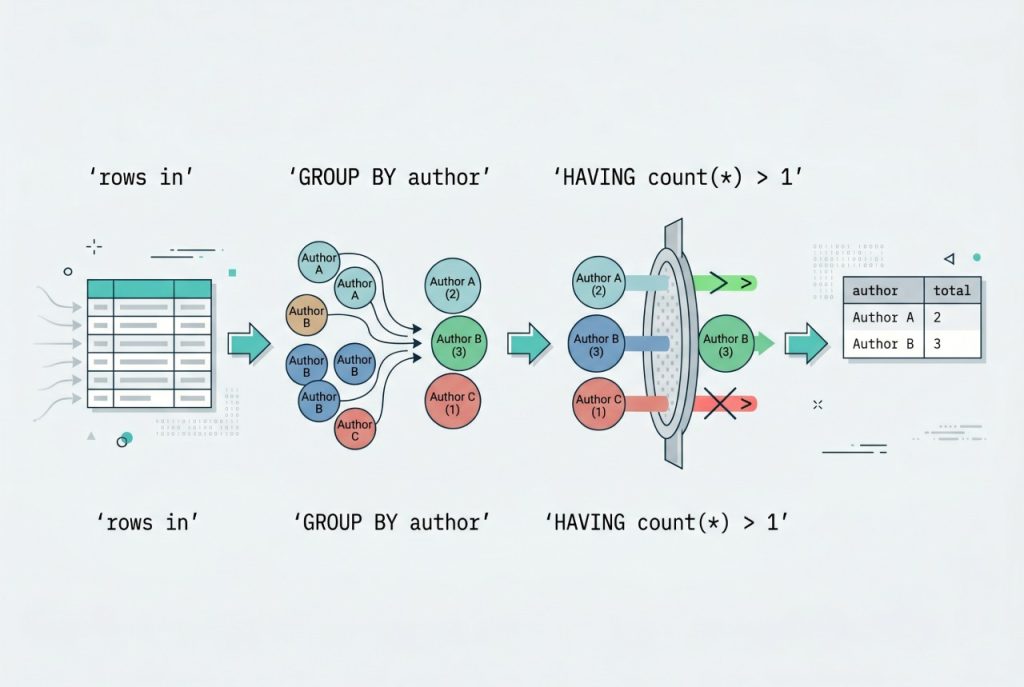
Filtering groups with HAVING
WHERE filters rows before grouping; HAVING filters groups after. To show only authors with more than one book:
$books = Book::select('author', DB::raw('count(*) as total'))
    ->groupBy('author')
    ->havingRaw('count(*) > ?', [1])
    ->get();
Because total is declared as an alias in the SELECT list, you can also use the fluent form against the alias:
->having('total', '>', 1)Collection-based grouping (small tables only)
Laravel collections have their own groupBy() that works entirely in PHP:
$perAuthor = Book::all()->groupBy('author')->map->count();
// $perAuthor is a keyed collection: ['Tolkien' => 3, 'Orwell' => 2, ...]
The syntax is terse and useful for small, already-in-memory collections. Do not use it on large tables — Book::all() loads every row, then PHP does the grouping work. The query-builder version pushes everything to MySQL and scales.
Frequently asked questions
MySQL 5.7+ enables ONLY_FULL_GROUP_BY strict mode by default, which requires every non-aggregated column in the SELECT list to appear in the GROUP BY clause. Either add the missing columns to groupBy(), wrap them in an aggregate like MAX(), or set 'strict' => false in config/database.php to disable the mode for that connection.
Use havingRaw() for count-based conditions: Book::select('author', DB::raw('count(*) as total'))->groupBy('author')->havingRaw('count(*) > ?', [1])->get(). That returns only authors with more than one book. You can also use the fluent having('total', '>', 1) since total is a declared alias in the SELECT.
groupBy() on the query or on the collection? Almost always on the query. Book::all()->groupBy('author')->map->count() works and reads nicely, but it loads every row into PHP first — fine for small tables, terrible once you’re past a few thousand rows. The query-builder form pushes the work to MySQL and returns just the aggregated rows.
Yes — pass multiple column names to groupBy(): Book::select('author', 'language', DB::raw('count(*) as total'))->groupBy('author', 'language')->get(). Every selected non-aggregate column must be in the groupBy list (strict mode), which is another reason the SELECT and GROUP BY drift tends to cause errors.
The select aliases become properties on each result row. With select('author', DB::raw('count(*) as total')), the loop gives you $row->author and $row->total. If you’d rather work with an Eloquent model instance, skip the groupBy aggregate and use withCount('books') on the parent model instead.
Related guides
- How to Install Laravel on Ubuntu — set up the framework before writing aggregate queries.
- Best Way to Insert or Update Records in Laravel Eloquent — another single-query aggregate pattern.
- How to Add Foreign Keys in Laravel Migration — relevant when grouping across a parent relationship.
References
Query-builder grouping, having, and raw expressions: laravel.com/docs/queries. Eloquent aggregates and withCount: laravel.com/docs/eloquent.