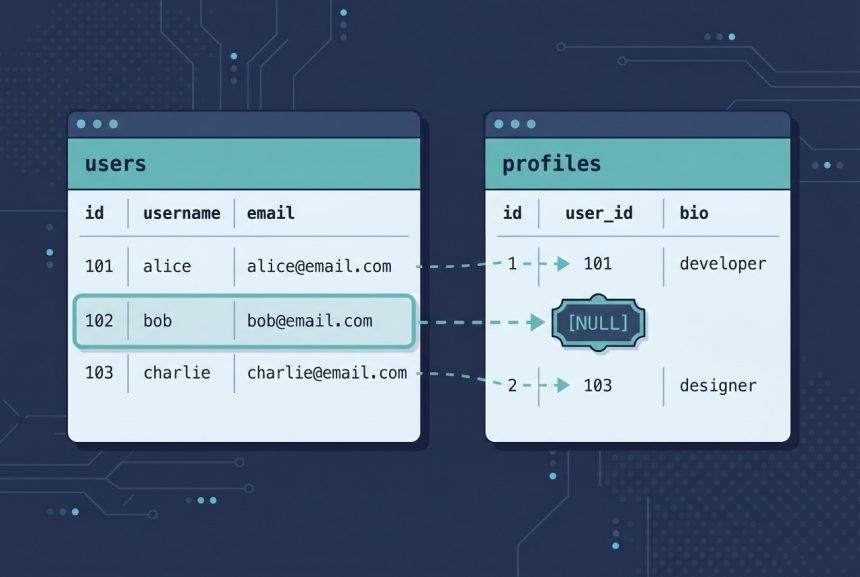
A laravel left outer join — every row from the left table, optional match on the right, NULL where there’s no match — is the right tool whenever the right-hand relationship is optional: users with or without profiles, products with or without reviews, orders with or without refunds. Laravel’s query builder exposes it as leftJoin(), and this guide shows the four-argument shorthand, a full working example, the closure form for multiple conditions, leftJoinSub for joining subqueries, and when to skip joins entirely in favor of Eloquent’s with().
Last verified: 2026-04-21 on Laravel 11 with PHP 8.3 and MySQL 8.0. Originally published 2023-10-10, rewritten and updated 2026-04-21.
TL;DR
Chain ->leftJoin('right_table', 'left_table.id', '=', 'right_table.left_id') onto the query builder. join is an inner join; leftJoin keeps every row from the left side and fills the right-side columns with NULL when nothing matches. For multiple join conditions, pass a closure. For subqueries, use leftJoinSub.
Basic syntax
The core method call you’ll use 90% of the time:
->leftJoin('right_table', 'left_table.id', '=', 'right_table.left_id')Four positional arguments: the right-hand table, the left-side column, the comparison operator (almost always '='), and the right-side foreign-key column. The method returns the same query builder so you can chain further where, select, or orderBy calls.
A full working example
Say you have a users table and an optional profiles table keyed by user_id. You want every user plus their profile bio where one exists, NULL otherwise:
use Illuminate\Support\Facades\DB;

$rows = DB::table('users')
    ->select('users.id', 'users.name', 'users.email', 'profiles.bio')
    ->leftJoin('profiles', 'users.id', '=', 'profiles.user_id')
    ->orderBy('users.id')
    ->get();
The generated SQL is:
SELECT users.id, users.name, users.email, profiles.bio
FROM users
LEFT JOIN profiles ON users.id = profiles.user_id
ORDER BY users.id ASC
Users without a profile row still appear in the result; profiles.bio is null for them. Swap DB::table('users') for User::query() if you want an Eloquent model query — the join API is identical.
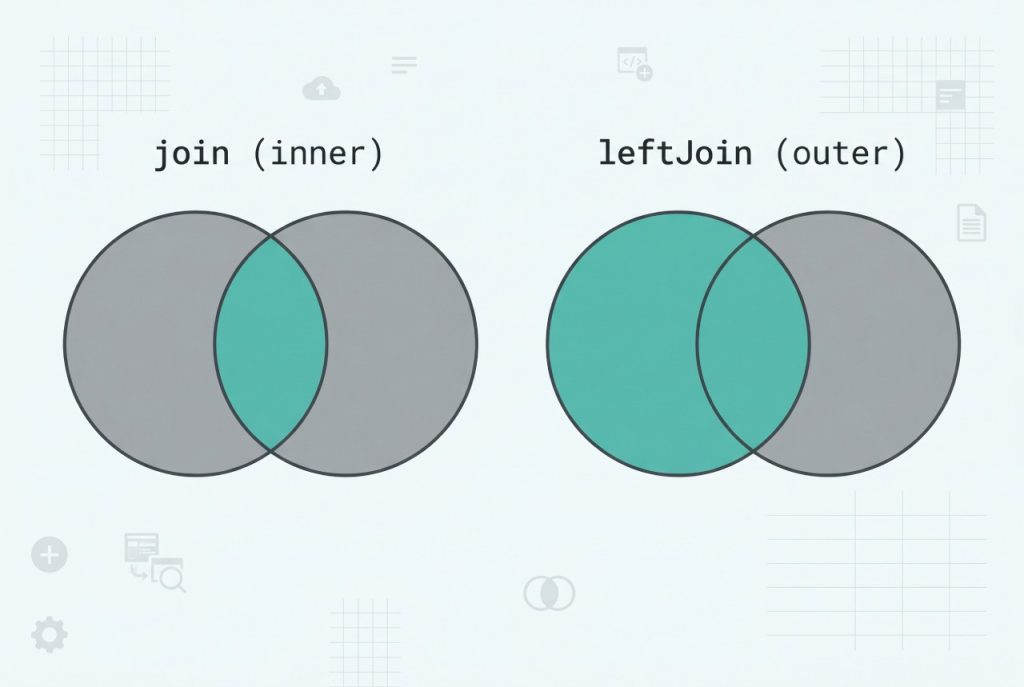
join vs leftJoin: the set behavior
Same table layout, different join call — different result:
// Inner join: only users who HAVE a profile
DB::table('users')
    ->join('profiles', 'users.id', '=', 'profiles.user_id')
    ->get();

// Left outer join: ALL users, profile columns NULL if no profile
DB::table('users')
    ->leftJoin('profiles', 'users.id', '=', 'profiles.user_id')
    ->get();
Picking the wrong one is the most common join bug: if you see “users mysteriously disappearing from the report,” chances are an inner join is silently dropping rows because they have no matching right-side record.
Multiple conditions via closure
When the join condition is more than a single column equality — say, only join paid orders — pass a closure instead of the four-arg shorthand:
DB::table('users')
    ->leftJoin('orders', function ($join) {
        $join->on('users.id', '=', 'orders.user_id')
             ->where('orders.status', '=', 'paid');
    })
    ->select('users.id', 'users.name', 'orders.total')
    ->get();
Inside the closure you have the full join grammar: on, orOn, where, whereIn, whereNull, and so on. Anything that belongs in the ON clause goes here — don’t move these conditions to the outer where, because that converts a left join into an inner join at the semantic level (filtering NULL right-side rows back out).
Joining a subquery: leftJoinSub
Sometimes the right side isn’t a table but a derived result set — say, each user’s most recent post. Build the subquery separately and pass it to leftJoinSub:
$latestPost = DB::table('posts')
    ->selectRaw('user_id, MAX(created_at) as last_post')
    ->groupBy('user_id');

$rows = DB::table('users')
    ->leftJoinSub($latestPost, 'p', 'users.id', '=', 'p.user_id')
    ->select('users.id', 'users.name', 'p.last_post')
    ->get();
The second argument ('p') is the alias used everywhere else in the outer query. The remaining three positional arguments are the same first-column / operator / second-column triplet as leftJoin.
When to use Eloquent with() instead
If you’re working with Eloquent models and relationships, a raw join is often the wrong tool. User::with('profile')->get() runs two queries — one for users, one for their profiles — and hydrates them as related models. You get full Eloquent features: mutators, casts, relationship methods on the loaded objects.
// With a hasOne / hasMany relationship defined on User:
$users = User::with('profile')->get();

foreach ($users as $user) {
    echo $user->name.': '.($user->profile?->bio ?? 'no bio').PHP_EOL;
}
Rule of thumb: use with() for object-oriented application code, use leftJoin when you need a single flat rowset (reports, exports, CSV dumps) or when you need to filter on right-side columns in ways Eloquent relationships can’t express efficiently.
Frequently asked questions
Chain ->leftJoin('right_table', 'left_table.id', '=', 'right_table.left_id') onto a query builder. The four arguments are: the right table, the left-side column, the operator ('=' for equi-joins), and the right-side column. The method is on the query builder, so start from DB::table('left_table') or Model::query().
leftJoin different from join? join performs an inner join: rows are returned only where a match exists in both tables. leftJoin returns every row from the left table and fills the right-side columns with NULL when no match is found. Use leftJoin when you want “users and their optional profiles” — users without a profile row still appear.
Yes. Pass a closure instead of the four-argument shorthand: ->leftJoin('orders', function ($j) { $j->on('users.id', '=', 'orders.user_id')->where('orders.status', 'paid'); }). Anything you can do inside a WHERE you can do inside the join condition, including orOn and whereIn.
Use leftJoinSub. Build the subquery with the query builder, give it an alias, then pair it with the join condition: $latest = DB::table('posts')->selectRaw('user_id, MAX(created_at) as last_post')->groupBy('user_id'); DB::table('users')->leftJoinSub($latest, 'p', 'users.id', '=', 'p.user_id')->get();
with() instead of a raw join? Use with() when you’re working with Eloquent models and relationships — User::with('posts')->get() is cleaner, eager-loads in a separate query, and gives you full model hydration. Reach for leftJoin when you need the database to produce a single flat result set (reports, exports, aggregates) or when you need columns from the right table in WHERE / ORDER BY clauses the relationship can’t express.
Related guides
- How to Install Laravel on Ubuntu — set up Laravel 11 before building queries.
- How to Add Foreign Keys in Laravel Migration — design the relationships your joins rely on.
- Laravel Eloquent where / orWhere — filter the joined result set.
- Laravel Eloquent group by + count — aggregate across joined rows.
References
Official Laravel query builder docs (joins, leftJoin, leftJoinSub): laravel.com/docs/queries. Eloquent eager-loading with with(): laravel.com/docs/eloquent.