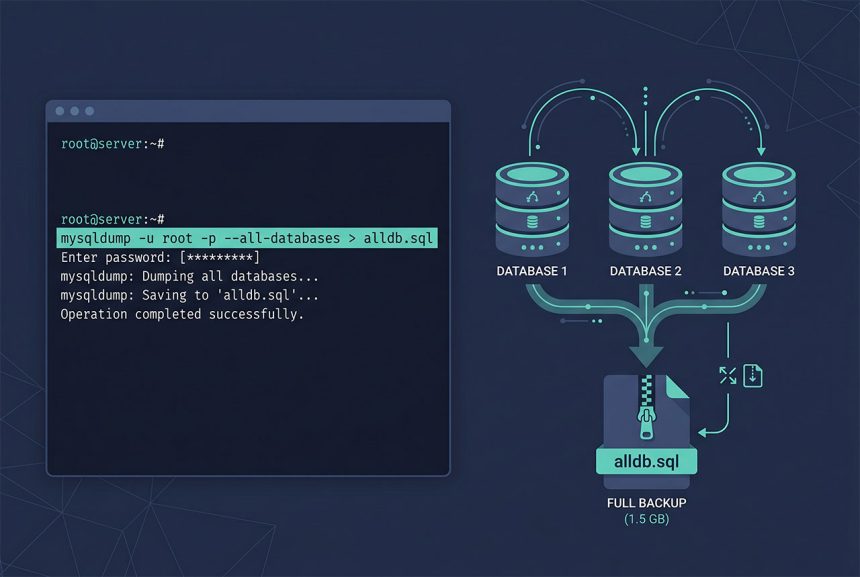
The standard mysqldump all databases pair exports every database to a single SQL file with mysqldump, and imports it back with mysql. Handy for snapshotting a whole server, migrating between hosts, or running regular backups. This guide covers the basic commands, the --skip-lock-tables / --single-transaction options for live servers, and compression for when the dump is large.
Last verified: 2026-04-23 on MySQL 8.0 and MariaDB 10.11. Originally published 2022-12-06, rewritten and updated 2026-04-23.
TL;DR
# Export everything
mysqldump -u root -p --all-databases > alldb.sql

# Production-safe variant (InnoDB): transactional, no table locks
mysqldump -u root -p --all-databases --single-transaction --quick > alldb.sql

# Import
mysql -u root -p < alldb.sql
Export
mysqldump -u root -p --all-databases > alldb.sqlDumps every database on the server including system databases (mysql, sys) and their user accounts, stored procedures, events. The output is a single plain-text SQL file you can open and read. Size depends on data volume — expect roughly 1-2× the actual data size.
For production servers with live traffic, the default mysqldump locks tables during the dump. Two options to avoid the freeze:
# MyISAM-heavy or mixed — skip locks, accept slight inconsistency
mysqldump -u root -p --all-databases --skip-lock-tables > alldb.sql

# InnoDB-only — transactional consistency, no locks
mysqldump -u root -p --all-databases --single-transaction --quick > alldb.sql
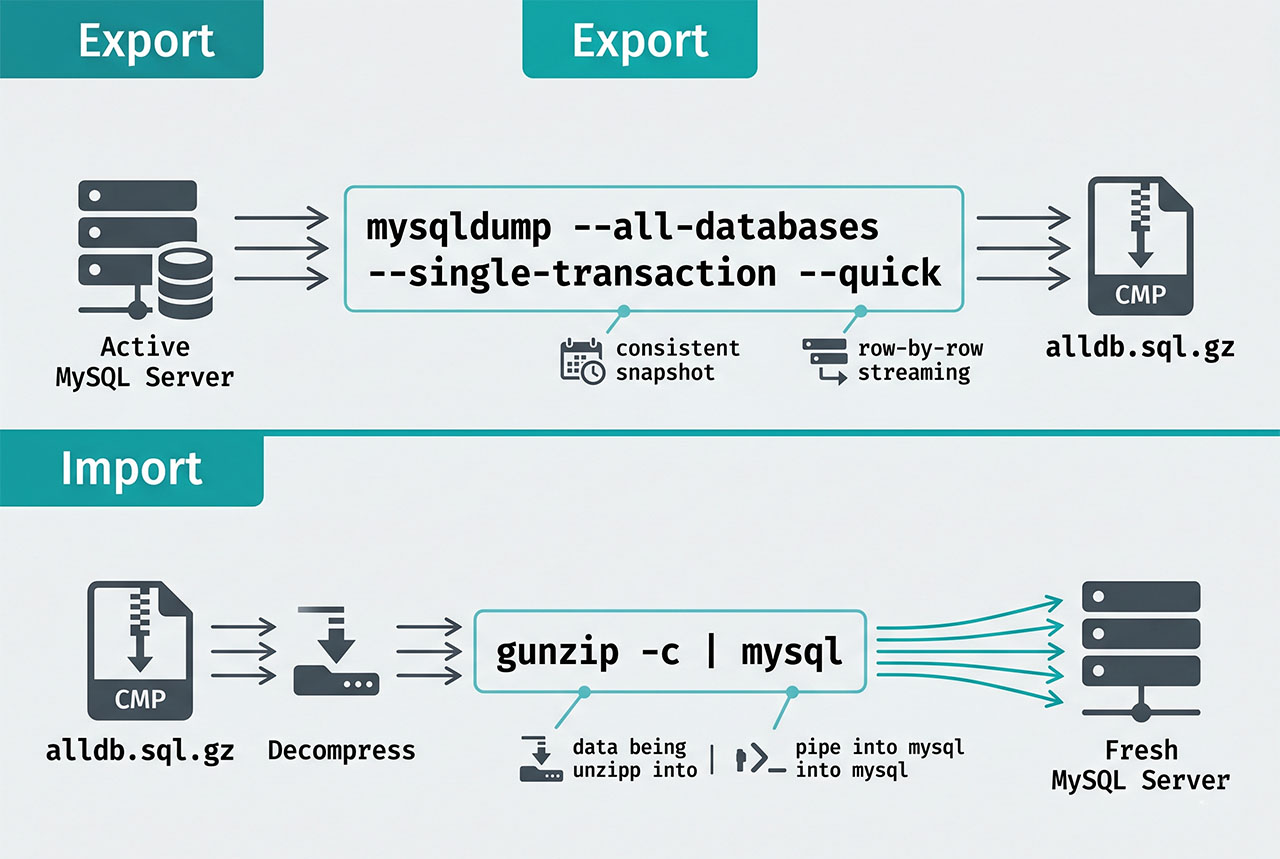
--single-transaction is the right default for modern InnoDB tables: the dump runs inside a long-running transaction, so you get a consistent snapshot without blocking other traffic. Pair with --quick to stream rows instead of buffering them — keeps memory use low on big tables.
Compress while dumping
# Gzip on the fly — typical 5-10× compression
mysqldump -u root -p --all-databases | gzip > alldb.sql.gz

# Restore from compressed
gunzip -c alldb.sql.gz | mysql -u root -p
For backup retention, gzip-on-write is almost always worth it. SQL compresses exceptionally well — a 1GB dump typically shrinks to 100-200MB. Decompression-on-import pipes the stream directly into mysql without needing disk space for the uncompressed intermediate.
Scheduling nightly backups
# /etc/cron.d/mysql-backup — keep the last 7 days
0 3 * * * root mysqldump --defaults-file=/root/.my.cnf --all-databases --single-transaction --quick | gzip > /var/backups/mysql/db-$(date +\%Y\%m\%d).sql.gz
15 3 * * * root find /var/backups/mysql -name 'db-*.sql.gz' -mtime +7 -delete
/root/.my.cnf holds the credentials so they’re not on the command line ([client]\nuser=root\npassword=...\n, chmod 600). The find ... -mtime +7 -delete second job rotates old backups. For offsite retention, pipe or rsync the gzipped file to S3, another server, or a cold-storage host.
Import
mysql -u root -p < alldb.sqlStreams the dump file to mysql, which executes each statement in order. --all-databases dumps include the CREATE DATABASE statements, so the target server doesn’t need those databases to exist beforehand. For a fresh destination, the import recreates everything from scratch.
For a single-database import from an --all-databases dump, use sed or grep to extract just that database’s section, or re-dump with --databases <name> from the source if it’s still available.
Frequently asked questions
mysqldump -u root -p --all-databases > alldb.sql. Captures every database on the server — schema, data, user accounts, stored procedures, events. Import with mysql -u root -p < alldb.sql. Works on any MySQL or MariaDB version.
--skip-lock-tables? Without it, mysqldump locks each table in each database for the duration of its dump. On a production server with traffic, that freezes queries until the dump finishes — potentially minutes. --skip-lock-tables trades a slight consistency risk (rows changing mid-dump could appear in one table but not a related one) for keeping the site responsive. For transactionally-consistent dumps on InnoDB, use --single-transaction instead — best of both worlds for InnoDB tables.
--all-databases doesn’t have an exclude flag, but you can list specific databases with --databases db1 db2 db3. For a scripted “everything except schema X,” query the list dynamically: mysql -Ne "SHOW DATABASES" | grep -vE '^(mysql|sys|information_schema|performance_schema|excluded_db)$' | xargs mysqldump -u root -p --databases > alldb.sql.
Pipe through gzip: mysqldump -u root -p --all-databases | gzip > alldb.sql.gz. Typical compression ratio is 5-10× for SQL. Import with gunzip -c alldb.sql.gz | mysql -u root -p. For a live backup-over-SSH: mysqldump ... | ssh backup-host 'cat > alldb.sql.gz'.
mysql -u root -p < alldb.sql reads the file sequentially and runs each statement. For big dumps this is slow because every insert commits individually. Two speed-ups: disable binary logging during import (SET sql_log_bin = 0; at the top of the dump), and use mysqlpump or mydumper for parallelized restore. For normal 10-100GB dumps, sequential is fine — just let it run.
Related guides
- How to Install MySQL on Ubuntu — the fresh install that accepts the import.
- How to Troubleshoot MariaDB Not Starting — when you need the backup to recover.
- How to Create Users and Grant Privileges in MySQL 8 — –all-databases dumps include user accounts.
- How to Reset the MySQL Root Password in aaPanel — admin access needed for the dump.
References
MySQL mysqldump: dev.mysql.com/doc/refman/8.0/en/mysqldump.