To add days to a date in PHP, the quick one-liner is date('Y-m-d', strtotime('+180 days')) for “180 days from now,” or $d->modify('+180 days') when you start from a DateTime object. This guide covers both: strtotime for short scripts, DateTimeImmutable for production code where timezone safety and immutability matter (subscription expiry dates, scheduled reminders, etc.).
Last verified: 2026-05-17 on PHP 8.3. Originally published 2022-09-19, rewritten and updated 2026-05-17.
TL;DR
// strtotime — quick one-liner from "now"
echo date('Y-m-d', strtotime('+180 days'));
// 2026-11-13

// strtotime — from a specific start date
$start = strtotime('2026-05-17');
echo date('Y-m-d', strtotime('+180 days', $start));
// 2026-11-13

// DateTimeImmutable — production-safe, timezone-aware
$start  = new DateTimeImmutable('2026-05-17', new DateTimeZone('UTC'));
$expiry = $start->modify('+180 days');
echo $expiry->format('Y-m-d');
// 2026-11-13
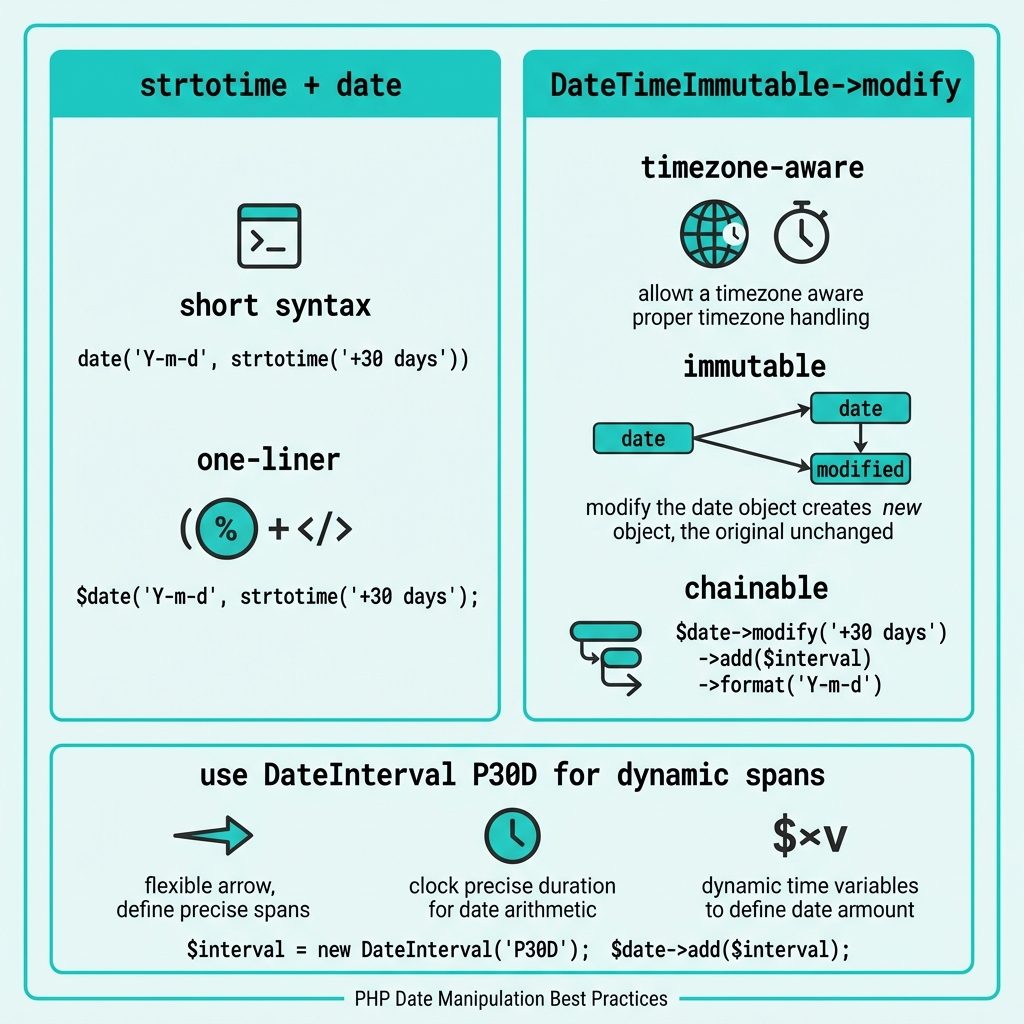
strtotime + date
strtotime parses an English-language date expression and returns a Unix timestamp. date formats a timestamp. Together they make a tight one-liner:
// 180 days from today
echo date('Y-m-d', strtotime('+180 days'));

// From a specific anchor date
$from = strtotime('2026-05-17');
echo date('Y-m-d', strtotime('+180 days', $from));
Anything strtotime accepts works as the offset: '+30 days', '+2 weeks', '+6 months', '-1 year', 'next Monday'. The second argument is optional — when omitted, “now” is used.
DateTimeImmutable (recommended for app code)
For anything beyond a one-liner — a subscription system, a reminder scheduler, anything that flows through multiple functions — DateTimeImmutable is the cleaner choice. It’s explicit about timezone, can’t be mutated by accident, and chains nicely:
$start  = new DateTimeImmutable('2026-05-17', new DateTimeZone('UTC'));
$expiry = $start->modify('+180 days');

echo $expiry->format('Y-m-d');     // 2026-11-13
echo $start->format('Y-m-d');      // 2026-05-17  (unchanged)
Note that $start is unchanged — modify on a DateTimeImmutable returns a new object. If you accidentally use DateTime (mutable) instead, $start->modify(...) would change $start in place, which is a common source of bugs when the object is passed between functions.
Subtracting days
// strtotime
echo date('Y-m-d', strtotime('-30 days'));

// DateTimeImmutable
$past = (new DateTimeImmutable())->modify('-30 days');
echo $past->format('Y-m-d');
Same syntax, with a minus sign. Or use DateInterval if you want an explicit period:
$past = (new DateTimeImmutable())->sub(new DateInterval('P30D'));P30D is ISO 8601 for “period of 30 days.” Useful when the interval is dynamic (you might want to compose PnD from a database value).
A subscription-expiry example
The use case from the original question — calculate when a subscription expires:
function expiry_date(string $start, int $days): string
{
    return (new DateTimeImmutable($start, new DateTimeZone('UTC')))
        ->modify("+{$days} days")
        ->format('Y-m-d');
}

echo expiry_date('2026-05-17', 30);    // 2026-06-16
echo expiry_date('2026-05-17', 180);   // 2026-11-13
Type-hinted, timezone-pinned, immutable. Drop into any framework (Laravel, Symfony, plain PHP) without surprises.
Frequently asked questions
strtotime or DateTime? For new code, prefer DateTime / DateTimeImmutable — they’re explicit, timezone-aware, support method chaining, and play well with type hints. strtotime is fine for short scripts and one-off conversions; it’s a comfortable one-liner but returns an integer timestamp that loses timezone information. For a subscription expiry date in a production app, DateTimeImmutable with explicit timezone is the safer default.
DateTime and DateTimeImmutable? DateTime is mutable — calling $d->modify('+30 days') changes the original object. DateTimeImmutable returns a new object instead. In application code, immutable is usually what you want, because passing a DateTime into a function and having it silently mutated is a common source of bugs. Same API, just safer.
Same syntax, with a minus sign. strtotime('-30 days'), $d->modify('-30 days'), or $d->sub(new DateInterval('P30D')). All three work; the modify form is the most readable.
strtotime('+1 month') sometimes skip a day? Because ‘month’ isn’t a fixed number of days. strtotime('+1 month', strtotime('2026-01-31')) returns March 3rd, not February 31st (which doesn’t exist) — it adds 31 days. For calendar-month-end behavior, use DateTime::modify('last day of next month') or strtotime('first day of next month') with a manual day adjustment.
Yes. Both strtotime and DateTime accept the standard MySQL DATETIME format (2026-05-17 10:30:00). For a DATE column it’s even cleaner: $d = new DateTimeImmutable($row['start_date']); $expiry = $d->modify('+180 days')->format('Y-m-d');.
Related guides
- How to Display PHP Errors
- How to Convert a String to Float in PHP
- How to Delete an Element from an Array in PHP
References
PHP DateTimeImmutable: php.net/manual/en/class.datetimeimmutable.php. strtotime supported formats: php.net/manual/en/datetime.formats.php.