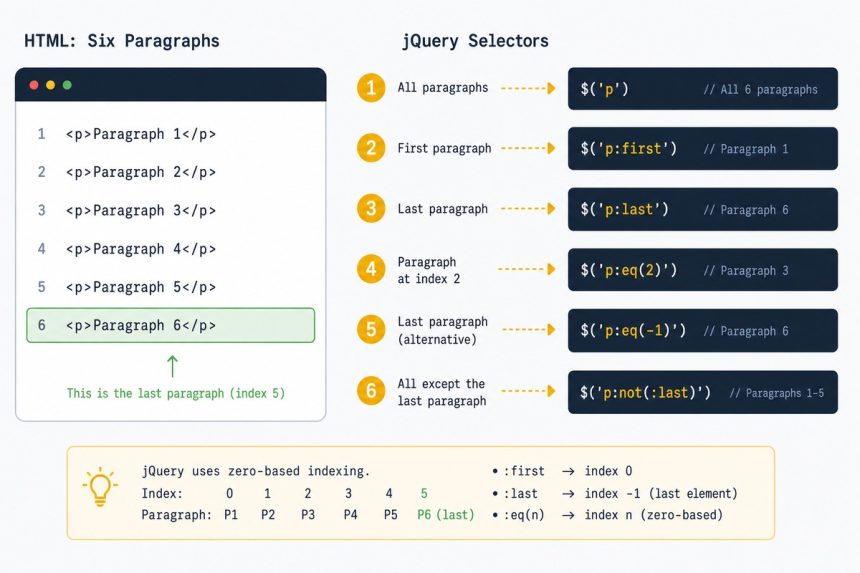
To select the last child element with jQuery, use $('.parent').children().last() for the last child of any type, or $('.parent p').last() for the last <p> specifically. The selectors :last and :last-child do similar but subtly different things — pick by the case below.
Last verified: 2026-05-17 with jQuery 3.7. Originally published 2022-09-17, rewritten and updated 2026-05-17.
The three equivalent forms
<div class="article">
  <p>Some random text 1</p>
  <p>Some random text 2</p>
  <!-- ... -->
  <p>Some random text 6</p>
</div>
// Children — method form (recommended)
$('.article').children().last();
// :last — jQuery extension
$('.article p:last');
// :last-child — CSS pseudo-class
$('.article p:last-child');All three return the last <p> in the example. The differences matter when the DOM gets messier — see below.
When the choice actually matters
<div class="article">
  <p>Some random text 1</p>
  <p>Some random text 2</p>
  <p>Some random text 3</p>
  <footer>Last footer</footer>   <!-- last child of .article -->
</div>
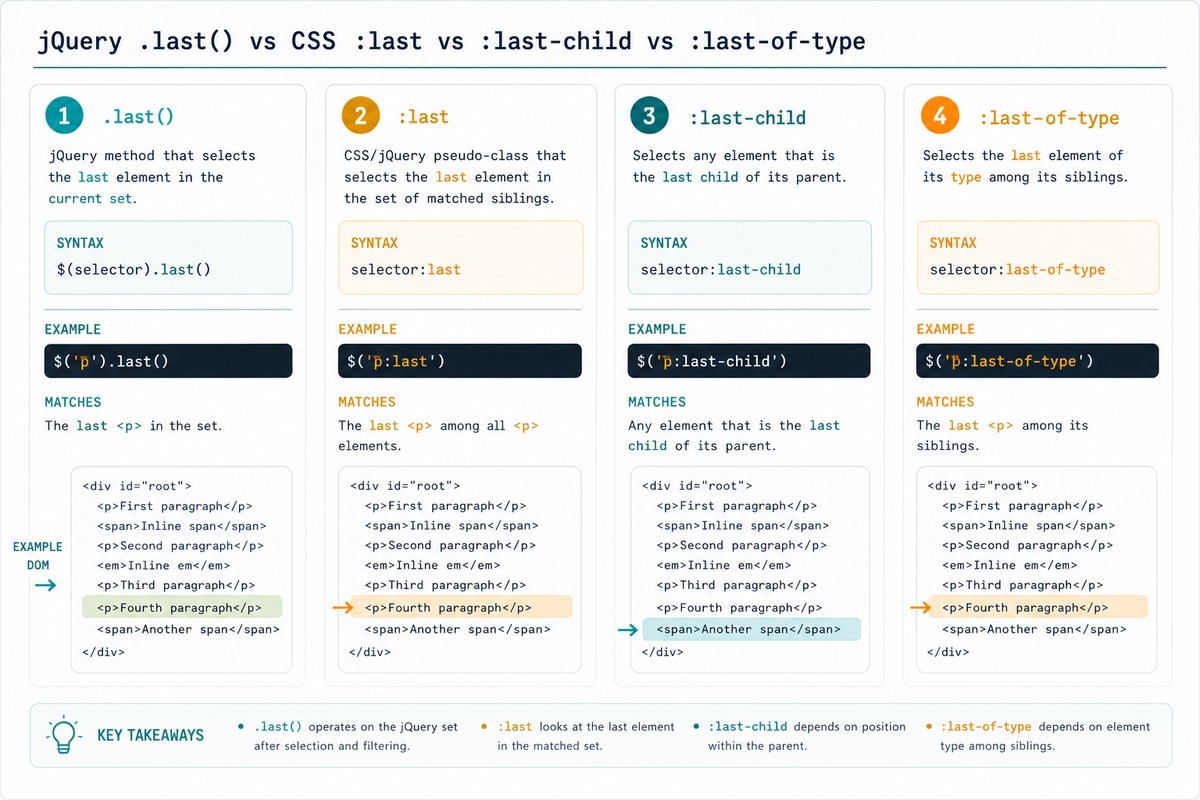
$('.article p').last()→ “Some random text 3” (last<p>, regardless of position)$('.article p:last')→ “Some random text 3” (same —:laston the matched set)$('.article p:last-child')→ nothing (no<p>is the literal last child of.article; the<footer>is)$('.article p:last-of-type')→ “Some random text 3” (last<p>among its siblings of the same type)
If you want “the last <p> regardless of what comes after,” reach for .last() or :last-of-type — not :last-child.
Use it to do something
// Add a class
$('.article p').last().addClass('final');

// Read its text
const lastPara = $('.article p').last().text();

// Append something after it
$('.article p').last().after('<p class="footnote">See references.</p>');
Vanilla JS equivalent
// Last  inside .article
document.querySelector('.article p:last-of-type');

// Or by collecting all and taking the last index
const paras = document.querySelectorAll('.article p');
const last  = paras[paras.length - 1];

// Last child element of any type
document.querySelector('.article').lastElementChild;
Frequently asked questions
:last and :last-child? :last is a jQuery extension that picks the last element from the matched set. :last-child is a standard CSS pseudo-class — it matches an element only if it’s the last child of its parent. For .article p:last vs .article p:last-child: if the last child of .article isn’t a <p>, :last-child matches nothing, but :last still returns the last <p>. Subtle and surprising — usually you want :last.
:last slower than :last-child? Yes — :last-child is a native CSS selector that the browser optimises (it uses document.querySelectorAll internally). :last requires jQuery to fetch every match and pick the last, so it can’t be passed to the browser’s native selector engine. For most pages the difference is negligible; on large DOMs with thousands of matches it can matter.
Use .last(): $('.article p').last() grabs the last <p> inside .article, regardless of whether it’s the literal last child. Pairs cleanly with .first() for symmetry. :last selector and .last() method are equivalent.
document.querySelector('.article p:last-of-type') for “the last <p> inside .article” — same idea as jQuery’s :last-of-type. Or document.querySelectorAll('.article p') followed by nodes[nodes.length - 1]. Both are widely supported, no library needed.
Related guides
- How to Get the Index in a jQuery .each() Loop
- How to Check if an Element Is Visible or Hidden with jQuery
- How to Scroll to an Element Using jQuery
References
jQuery .last(): api.jquery.com/last. jQuery :last: api.jquery.com/last-selector. MDN :last-child: developer.mozilla.org/en-US/docs/Web/CSS/:last-child. MDN :last-of-type: developer.mozilla.org/en-US/docs/Web/CSS/:last-of-type.