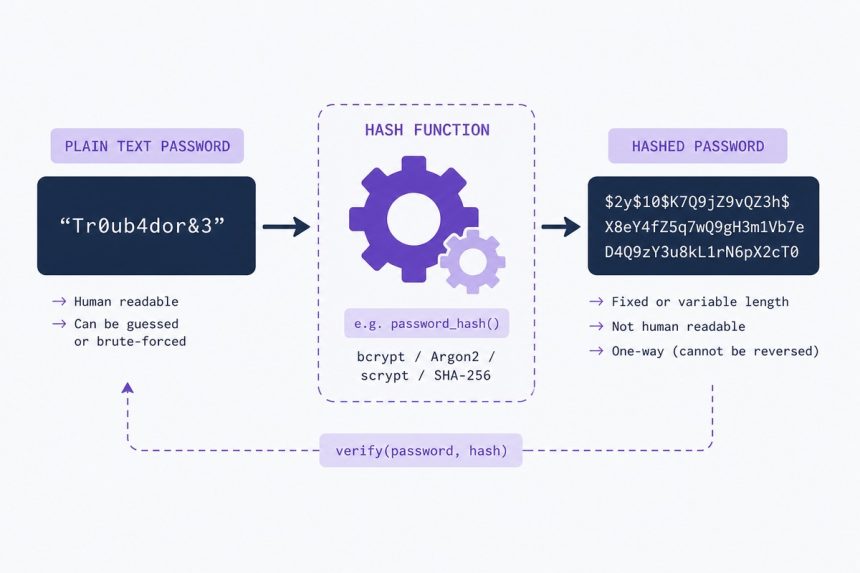
To create a secure password hash in PHP, use the built-in password_hash function with PASSWORD_DEFAULT (bcrypt) or PASSWORD_ARGON2ID for the current cryptographic best practice. Never use MD5 or SHA — those are fast hashes built for files, not passwords. Verify on login with password_verify and re-hash old hashes when a stronger algorithm becomes available.
Last verified: 2026-05-17 on PHP 8.3. Originally published 2023-01-03, rewritten and updated 2026-05-17.
Hash and verify
// Registration / password change
$hash = password_hash($plaintext, PASSWORD_DEFAULT);
// Store $hash in the database (255 chars is a safe column size)

// Login
if (password_verify($plaintext, $hash)) {
    // Authentic — log the user in
} else {
    // Wrong password
}
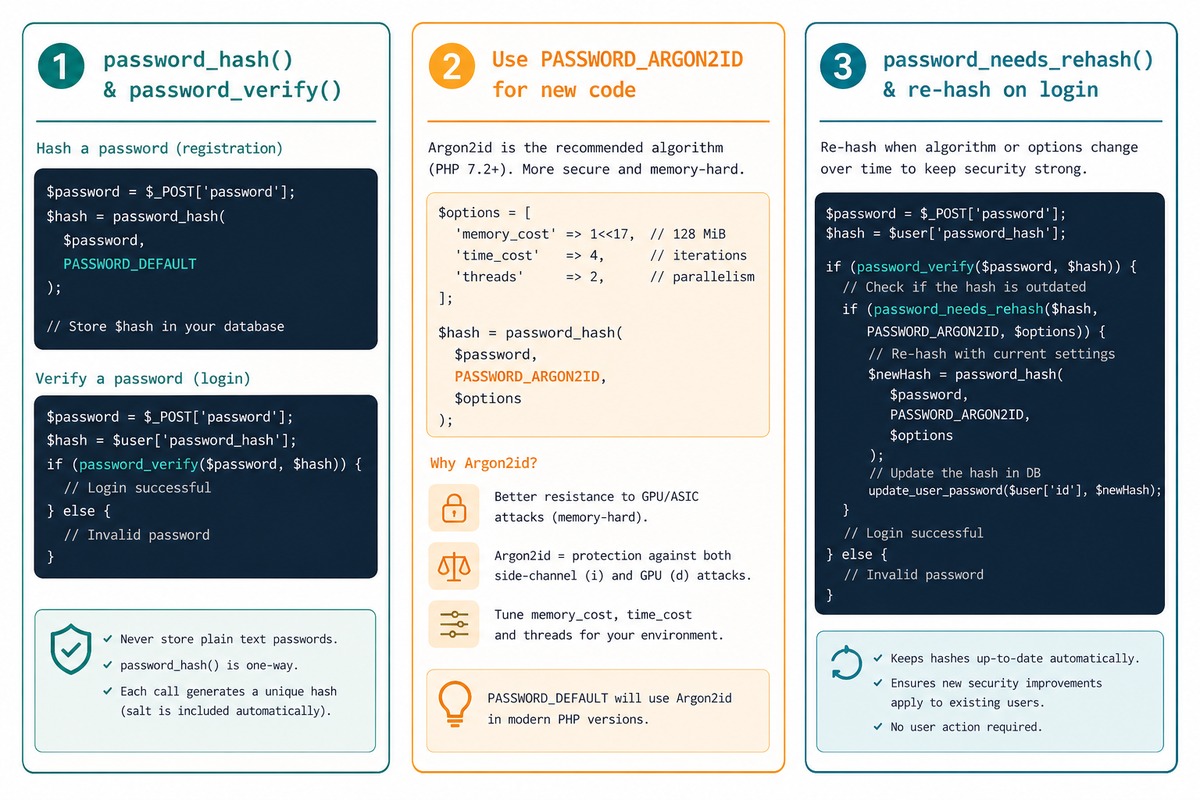
PASSWORD_DEFAULT currently means bcrypt. PHP’s commitment is that this constant always points at the strongest algorithm shipped with that PHP version — using it future-proofs your code.
Argon2id — the modern recommendation
// PHP 7.3+
$hash = password_hash($plaintext, PASSWORD_ARGON2ID);

// Tunable options
$hash = password_hash($plaintext, PASSWORD_ARGON2ID, [
    'memory_cost' => 65536,   // 64 MB — RAM use
    'time_cost'   => 4,       // iterations
    'threads'     => 2,
]);
Argon2id won the 2015 Password Hashing Competition and is the current cryptographic best practice. It’s more resistant to GPU-accelerated brute force than bcrypt because it’s memory-hard — every guess requires significant RAM. The cost parameters above are sensible defaults; raise them if your hardware can handle slower hashes (server-side login is the only place this runs).
Re-hash old hashes on login
if (password_verify($plaintext, $user->password_hash)) {
    // Authenticate first

    if (password_needs_rehash($user->password_hash, PASSWORD_DEFAULT)) {
        $user->password_hash = password_hash($plaintext, PASSWORD_DEFAULT);
        $user->save();
    }

    // ... log in
}
When PHP upgrades the default algorithm (or you raise the cost), password_needs_rehash returns true for hashes that don’t match the current settings. Re-hashing during login (when you have the plaintext) upgrades active users transparently over time. Dormant users are still on the old algorithm, which is acceptable — they’re not the attack surface.
Why MD5 / SHA-256 are wrong for passwords
// DON'T DO THIS
$hash = md5($plaintext);                       // ~10 billion guesses/sec on a GPU
$hash = hash('sha256', $plaintext);            // billions/sec, same problem
$hash = sha1($plaintext . $salt);              // billions/sec, salted but still fast
MD5/SHA were designed for fast hashing of arbitrary data (signatures, integrity checks). That speed is a security bug when applied to passwords — an attacker with a stolen password table can try every word in every dictionary in hours. password_hash with bcrypt or Argon2id is intentionally slow (~100 ms per guess on standard hardware), turning a hours-long attack into one that takes years.
Database column size
$table->string('password', 255); // safe ceiling for any algorithmbcrypt produces a 60-character hash; Argon2id strings can be 96+. Use VARCHAR(255) to leave headroom for future algorithm upgrades without schema changes.
Frequently asked questions
Those are fast cryptographic hashes — designed for hashing files and signatures, where speed is a feature. For passwords, fast is the opposite of what you want: an attacker who steals the password file can brute-force billions of MD5 hashes per second on a GPU. password_hash uses bcrypt (or Argon2id), which is intentionally slow — billions of guesses per second drop to thousands.
Re-hash on next login. After verifying with password_verify, call password_needs_rehash($hash, PASSWORD_DEFAULT) — returns true if the stored hash uses an older algorithm than your current default. If yes, hash the plaintext (which you have during login) with the current default and update the row. Over time, every active user’s password gets upgraded transparently.
No — password_hash generates a cryptographically random salt and embeds it in the result. The full hash string includes algorithm version, cost, salt, and the actual digest. You store one column and the salt comes along automatically. Manually salting (concatenating before hashing) used to be standard advice; the password_* API made it obsolete.
Both are intentionally slow password-hashing functions. Bcrypt is older (1999), battle-tested, the current PHP default. Argon2id (PASSWORD_ARGON2ID, available since PHP 7.3) won the Password Hashing Competition in 2015 and is the current cryptographic recommendation — it’s more resistant to GPU/ASIC attacks via memory hardness. For new projects, Argon2id is the better pick; for compatibility with existing bcrypt hashes, stick with the default.
Related guides
- How to Create a Login and Registration System in Laravel
- How to Fix Missing Authorization Header in PHP Requests
- How to Validate an Email Address in PHP
References
PHP password_hash: php.net/manual/en/function.password-hash.php. PHP password_verify: php.net/manual/en/function.password-verify.php. PHP password_needs_rehash: php.net/manual/en/function.password-needs-rehash.php. OWASP password storage cheat sheet: cheatsheetseries.owasp.org/cheatsheets/Password_Storage_Cheat_Sheet.html.