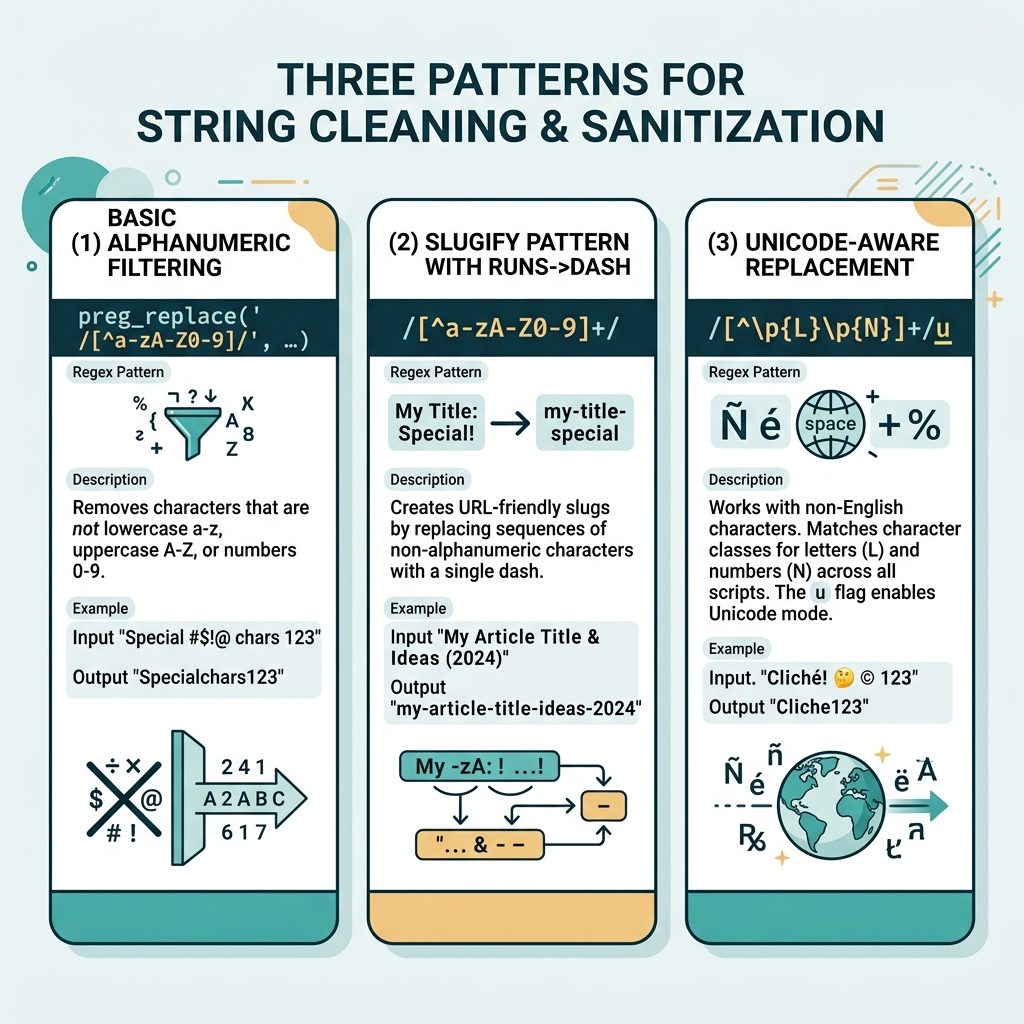
To remove unwanted characters from a string in PHP, use preg_replace() with a negated character class — keep what you want, drop the rest. The standard pattern for “letters and digits only” is preg_replace('/[^a-zA-Z0-9]/', '', $string). Tweak the character class for whitespace, dashes, dots, or other allowed characters.
Last verified: 2026-05-17 on PHP 8.3. Originally published 2022-07-01, rewritten and updated 2026-05-17.
Keep letters and digits only
$string = 'Hello! World #1 — best post ever?';
echo preg_replace('/[^a-zA-Z0-9]/', '', $string);
// HelloWorld1bestpostever
The negated character class [^a-zA-Z0-9] matches anything not in those ranges. Replacing every match with the empty string leaves only ASCII letters and digits.
Other common character classes
// Letters only (drop digits too)
preg_replace('/[^a-zA-Z]/', '', $s);

// Letters, digits, and whitespace
preg_replace('/[^a-zA-Z0-9\s]/', '', $s);

// Letters, digits, and a few punctuation characters
preg_replace('/[^a-zA-Z0-9.,!? ]/', '', $s);

// Digits and the decimal point only
preg_replace('/[^0-9.]/', '', $s);
For URL slugs from post titles
function slugify(string $title): string {
    $s = strtolower($title);
    $s = preg_replace('/[^a-z0-9]+/', '-', $s);   // runs of non-alnum -> single dash
    return trim($s, '-');
}

echo slugify('Hello! World #1 — Best Post Ever?');
// hello-world-1-best-post-ever
This is the canonical “post title → URL slug” pattern: lowercase, collapse every run of non-alphanumeric characters into a single dash, and trim leading/trailing dashes. Works for any title that’s safe in ASCII.
Unicode-safe variant
// Keep any Unicode letter or digit (accented, CJK, Cyrillic, etc.)
preg_replace('/[^\p{L}\p{N}]/u', '', $string);

// Slug from non-Latin title (preserves the letters)
function slugifyUnicode(string $title): string {
    $s = mb_strtolower($title);
    $s = preg_replace('/[^\p{L}\p{N}]+/u', '-', $s);
    return trim($s, '-');
}
The /u flag enables Unicode mode. \p{L} matches any Unicode letter, \p{N} any Unicode digit. Without /u, accented and non-Latin characters are treated as “not letters” and stripped — usually not what you want.
When you know the exact characters to strip
$bad   = ['!', '*', '#', '+', '&'];
$clean = str_replace($bad, '', $string);
str_replace() with an array argument is faster than a regex when you know the exact characters/substrings to remove and there aren’t many of them.
Frequently asked questions
It’s the building block, but a proper slug also lowercases, replaces spaces with dashes, and collapses repeated separators. The canonical pattern is: strtolower → preg_replace('/[^a-z0-9]+/', '-', $s) → trim($s, '-'). That single regex (replace runs of non-alphanumerics with one dash) does more in one pass than the bare “remove unwanted” version.
Use the Unicode flag and Unicode letter classes: preg_replace('/[^\p{L}\p{N}]/u', '', $str). \p{L} matches any Unicode letter; \p{N} matches any digit including Eastern Arabic numerals. Without the /u modifier, \p{L} errors out and accented characters are stripped.
preg_replace with a regex and str_replace with an array? preg_replace with a regex defines a pattern of what to strip; str_replace([...], '', $s) takes a finite list of strings to remove. Use str_replace when you know the exact unwanted characters (or substrings), the regex when you want to express a class (“keep only letters and digits”).
htmlspecialchars() after this? Different concern. The regex cleans the string’s content; htmlspecialchars() encodes characters that have meaning in HTML (<, >, &, ") so they don’t break markup. If your cleaned string still goes into HTML, run it through htmlspecialchars() before output — they’re complementary, not interchangeable.
Related guides
- How to Remove All Non-Numeric Characters from a String in PHP
- How to Get the First Character of a String in PHP
- How to Convert a String to Uppercase in PHP
References
PHP preg_replace(): php.net/manual/en/function.preg-replace.php. PHP str_replace(): php.net/manual/en/function.str-replace.php. PCRE Unicode properties: php.net/manual/en/regexp.reference.unicode.php.