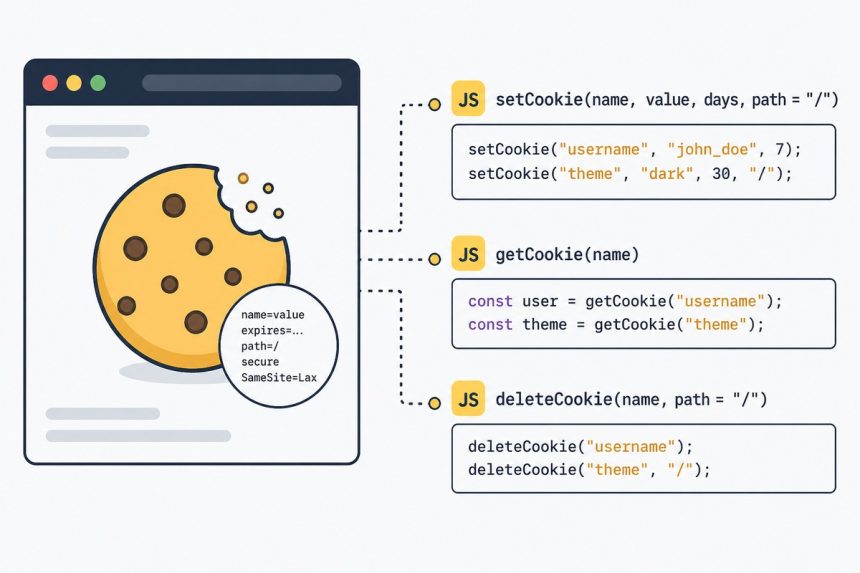
To set and get cookies with JavaScript, write to document.cookie with the cookie’s name, value, and attributes (expires, path, SameSite). Reading requires parsing the full document.cookie string — write a small helper once and reuse it.
Last verified: 2026-05-17 in Chrome 124, Firefox 125, Safari 17. Originally published 2022-12-07, rewritten and updated 2026-05-17.
Three small helpers
function setCookie(name, value, ttlSeconds) {
    let expires = '';
    if (ttlSeconds) {
        const d = new Date(Date.now() + ttlSeconds * 1000);
        expires = '; expires=' + d.toUTCString();
    }
    document.cookie = `${name}=${encodeURIComponent(value ?? '')}${expires}; path=/; SameSite=Lax`;
}

function getCookie(name) {
    const target = name + '=';
    for (const part of document.cookie.split(';')) {
        const c = part.trim();
        if (c.startsWith(target)) {
            return decodeURIComponent(c.slice(target.length));
        }
    }
    return null;
}

function deleteCookie(name) {
    document.cookie = `${name}=; path=/; expires=Thu, 01 Jan 1970 00:00:01 GMT`;
}
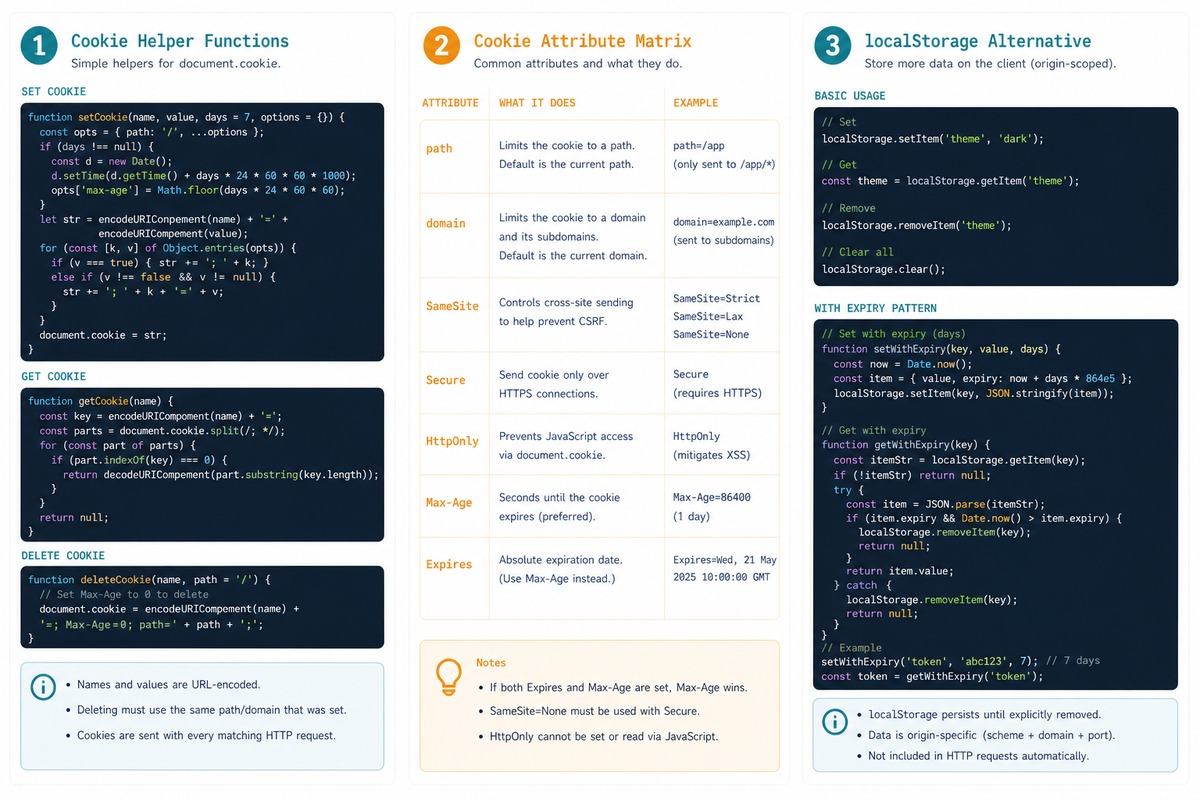
setCookie(name, value, ttlSeconds)— stores a value. The TTL is in seconds; pass 0 or omit it for a session cookie that disappears on browser close.getCookie(name)— returns the value, ornullif the cookie doesn’t exist.deleteCookie(name)— sets the expiry to the past, which removes the cookie.
Use case — once-a-day modal
if ( !getCookie('modal-shown') ) {
    $('#info-modal').modal('show');
}

$('#info-modal').on('hide.bs.modal', function () {
    setCookie('modal-shown', '1', 86400);   // 24 hours
});
Show the modal only if the user hasn’t already dismissed it today. Closing the modal sets a 24-hour cookie; the next page load skips the modal until the cookie expires.
Modern attributes you should include
path=/— site-wide. Without it, the cookie is scoped to the directory of the URL that set it.SameSite=Lax— modern default. Stops the cookie from being sent on cross-site iframes / images but allows it on regular navigations.Secure— only send over HTTPS. Add this in production:document.cookie = '...; path=/; SameSite=Lax; Secure'.HttpOnly— cannot be set from JavaScript. Server-issued cookies use this to block JS access (defence against XSS stealing session tokens). Server-side only.Max-Age=N— alternative toexpires=..., takes seconds. Both work;Max-Agereads more cleanly.
When to prefer localStorage
// Pure client-side storage — bigger limit, never sent to the server
localStorage.setItem('modal-shown', '1');

if ( ! localStorage.getItem('modal-shown') ) {
    showModal();
}

// "Expire" by storing a timestamp
function setWithExpiry(key, value, ttlMs) {
    localStorage.setItem(key, JSON.stringify({ value, expires: Date.now() + ttlMs }));
}
function getWithExpiry(key) {
    const item = localStorage.getItem(key);
    if (!item) return null;
    const { value, expires } = JSON.parse(item);
    if (Date.now() > expires) { localStorage.removeItem(key); return null; }
    return value;
}
For client-only flags that don’t need to ride along on every server request, localStorage is cleaner. The trade-off is that it has no built-in expiry — you store the expiration with the value.
Frequently asked questions
Cookies have an expires/max-age attribute, so a one-day TTL is one line. localStorage has no built-in expiry — you’d store a timestamp and compare on read. Cookies also get sent to the server on every request, which can be wasteful for client-only flags. For a pure client-side reminder timer, write the expiry into localStorage alongside the value: localStorage.setItem('seen', JSON.stringify({ value: 1, expires: Date.now() + 86400000 })).
SameSite do? SameSite controls when cookies are sent on cross-site requests. Strict: only on same-site navigation; not even sent when a link from another site brings the user to yours. Lax (default in modern browsers): sent on top-level cross-site GETs (link clicks) but not on background requests (iframes, image loads). None: sent on every cross-site request — requires Secure. For client-only flags, Lax is fine and modern browsers apply it by default.
Almost always the path attribute. Without path=/, the cookie is scoped to the directory of the URL that set it — set on /blog/post/, it’s invisible on / or /checkout/. Always include path=/ for site-wide cookies. The example below does.
Each cookie maxes out at 4 KB (including name, value, and attributes), and most browsers cap total cookies per domain at 50–180. The 4 KB limit is shared by the value — keep cookie payloads small. For more storage, use localStorage (5–10 MB per origin) or IndexedDB (many MB).
Related guides
- How to Check if a Bootstrap Modal Is Open with jQuery
- How to Check the HTTP Referrer with JavaScript
- How to Run Code on URL Hash Change in JavaScript
References
MDN document.cookie: developer.mozilla.org/en-US/docs/Web/API/Document/cookie. MDN SameSite: developer.mozilla.org/en-US/docs/Web/HTTP/Headers/Set-Cookie. MDN localStorage: developer.mozilla.org/en-US/docs/Web/API/Window/localStorage.