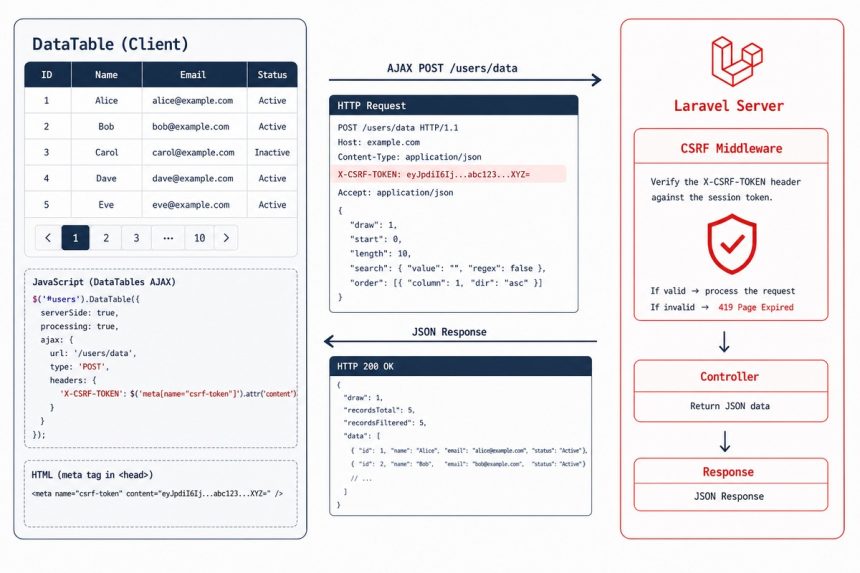
To fix Laravel’s CSRF token mismatch when using DataTables with Ajax, send the token as a request header — X-CSRF-TOKEN — via beforeSend in the ajax config. Putting it in data won’t work because DataTables manages that payload itself. The cleanest setup is to register the header globally via $.ajaxSetup so every Ajax request picks it up automatically.
Last verified: 2026-05-17 on Laravel 11 with DataTables 2.0. Originally published 2022-11-06, rewritten and updated 2026-05-17.
Per-table fix — beforeSend header
$('#my-table').DataTable({
    processing:   true,
    serverSide:   true,
    serverMethod: 'post',
    ajax: {
        url: "{{ route('route.name') }}",
        beforeSend: function (xhr) {
            xhr.setRequestHeader('X-CSRF-TOKEN', "{{ csrf_token() }}");
        }
    },
    columns: [
        { data: 'name' },
        { data: 'position' },
        { data: 'office' },
    ],
});
Laravel’s VerifyCsrfToken middleware reads the X-CSRF-TOKEN header on Ajax requests and validates against the session token. The header approach doesn’t conflict with DataTables’ own request params.
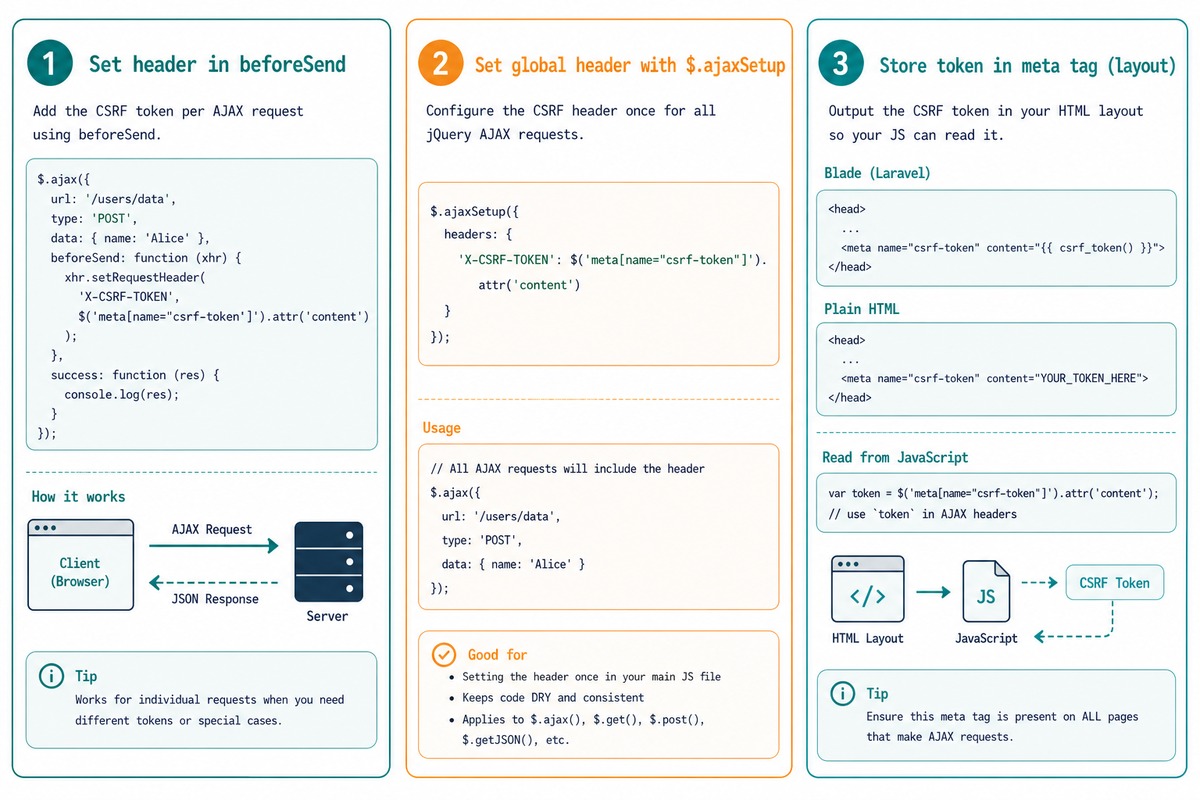
Global fix (recommended) — set the header once
<!-- In your layout's <head> -->
<meta name="csrf-token" content="{{ csrf_token() }}">

<script>
$.ajaxSetup({
    headers: {
        'X-CSRF-TOKEN': $('meta[name="csrf-token"]').attr('content')
    }
});
</script>
This is the pattern Laravel’s own docs recommend. Set it once on the layout, every Ajax call (DataTables, plain $.ajax, third-party widgets) picks it up automatically — no per-table configuration.
Inertia / Vue / React apps
// resources/js/bootstrap.js (default in fresh Laravel installs)
import axios from 'axios';

axios.defaults.headers.common['X-Requested-With'] = 'XMLHttpRequest';
// Laravel reads XSRF-TOKEN cookie and sends X-XSRF-TOKEN automatically
Modern Laravel installs ship with axios pre-configured. The default setup reads the encrypted XSRF-TOKEN cookie and sends it as X-XSRF-TOKEN on every request. For jQuery + DataTables, the manual $.ajaxSetup above does the same job.
Frequently asked questions
data: { _token: ... } not work with DataTables? DataTables uses the data option for its own server-side params (start, length, search, etc.). Adding _token there can collide or be ignored depending on whether you pass an object or a function. The header approach via beforeSend sends the CSRF token in the X-CSRF-TOKEN request header — exactly what Laravel’s VerifyCsrfToken middleware checks for AJAX requests, and it never collides with DataTables’ own payload.
Yes — set it once on jQuery’s defaults and every Ajax request (including DataTables) picks it up: $.ajaxSetup({ headers: { 'X-CSRF-TOKEN': $('meta[name="csrf-token"]').attr('content') } });. Combined with <meta name="csrf-token" content="{{ csrf_token() }}"> in your layout, this is Laravel’s official recommended pattern. No per-table configuration needed.
VerifyCsrfToken middleware find the token? It checks three places, in order: the _token field in the request body, the X-CSRF-TOKEN header, and the X-XSRF-TOKEN header (decoded from the encrypted cookie). For Ajax with serverSide DataTables, the header is the cleanest — body fields conflict with DataTables’ own params.
Don’t. CSRF protection exists to prevent another site from triggering state-changing requests on your users’ behalf. Excluding endpoints from VerifyCsrfToken bypasses the protection — fine for true public APIs (which usually don’t use session cookies anyway), but for in-app DataTables endpoints that read user-specific data, keep the protection on.
Related guides
- How to Create Ajax-Based Pagination in DataTables
- How to Load Data in DataTables Using Ajax
- How to Add an HTML Column in Laravel DataTables
References
Laravel CSRF protection: laravel.com/docs/csrf. DataTables Ajax: datatables.net/manual/ajax.