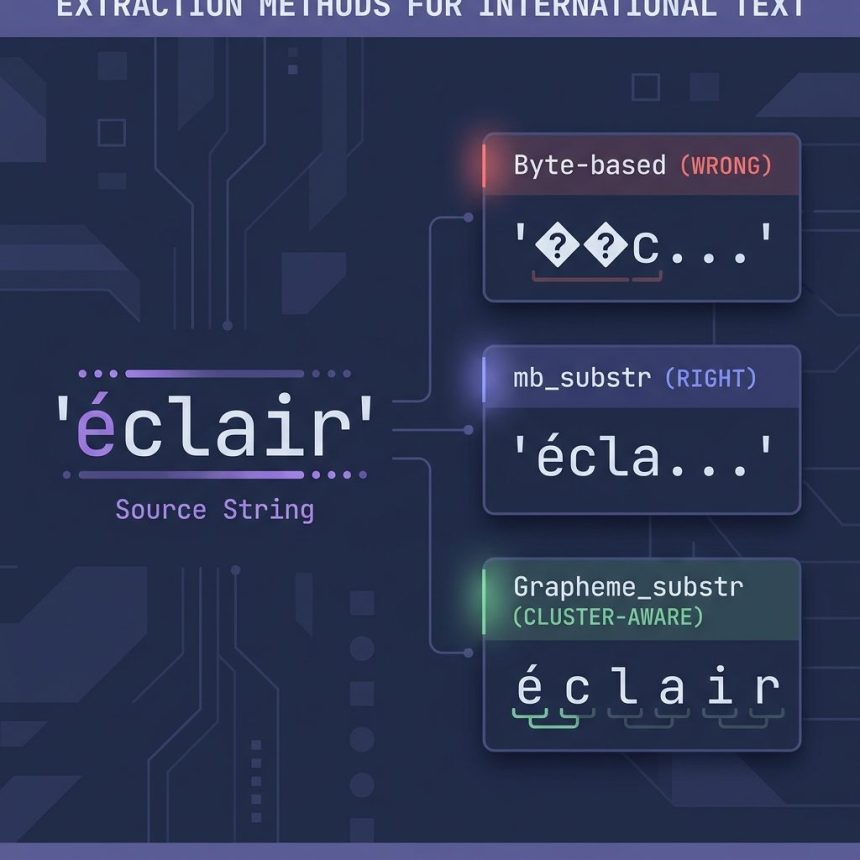
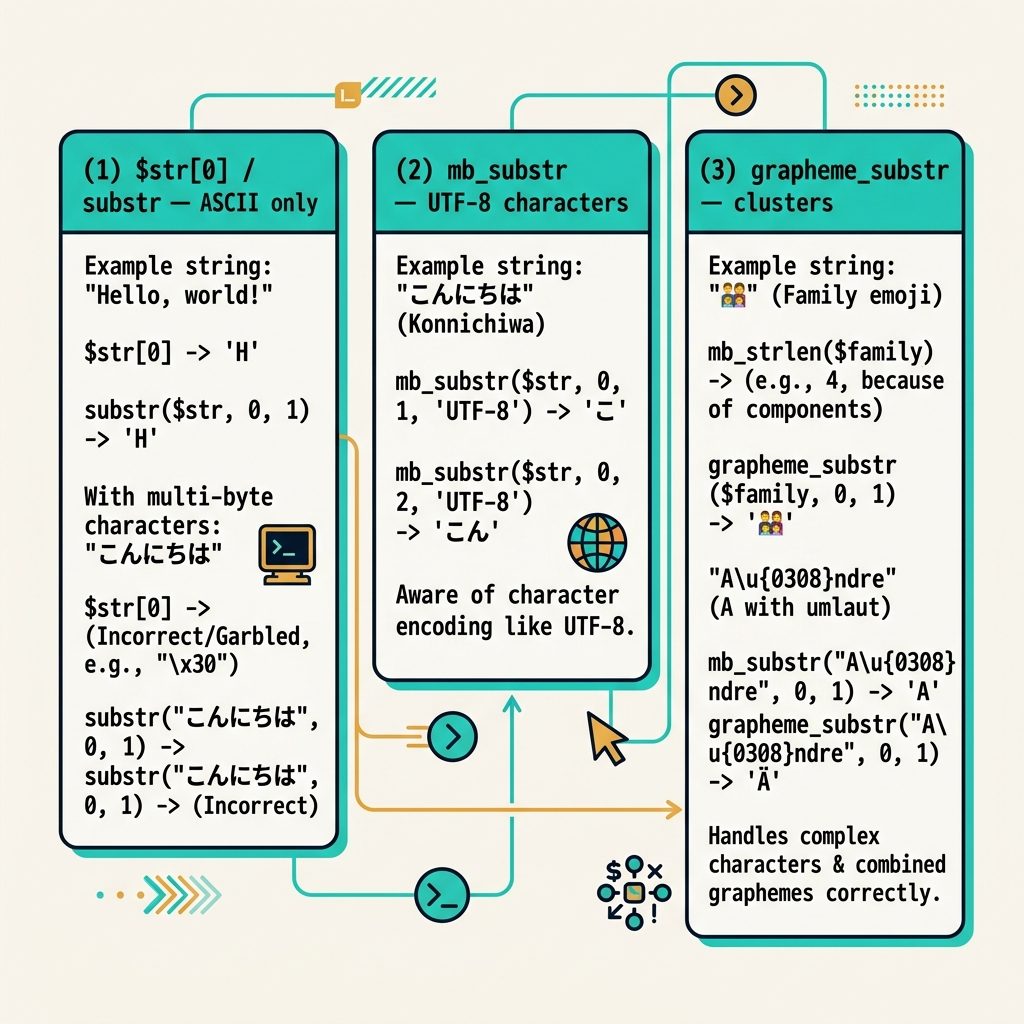
To get the first character of a string in PHP, use $str[0] for ASCII (or bytes), mb_substr($str, 0, 1) for UTF-8 and other multibyte encodings, or grapheme_substr($str, 0, 1) for grapheme-aware extraction (combining marks, emoji clusters).
Last verified: 2026-05-17 on PHP 8.3. Originally published 2022-10-18, rewritten and updated 2026-05-17.
ASCII / single-byte strings
$input = 'ab12476541';

// Bracket notation
$first = $input[0] ?? null;   // 'a'

// substr() — same result, no warning on empty input
$first = substr($input, 0, 1); // 'a'
Both read one byte. For ASCII (digits, basic Latin letters, punctuation), a byte is the same as a character — both methods work.
UTF-8 / multibyte strings
$input = 'éclair';

$input[0];                          // 'Ã'   — wrong: one byte of a 2-byte char
substr($input, 0, 1);               // 'Ã'   — same bug, bytes again
mb_substr($input, 0, 1);            // 'é'   — correct
UTF-8 stores each non-ASCII character as 2–4 bytes. Byte-based methods break those characters in half. mb_substr() is character-aware and handles the encoding correctly.
Grapheme-aware (emoji clusters, combining marks)
$input = '👍🏽 ok';

mb_substr($input, 0, 1);             // '👍'   — drops the skin-tone modifier
grapheme_substr($input, 0, 1);       // '👍🏽'  — keeps the whole cluster
Some emoji and accented characters are clusters — one user-visible character made of several code points. grapheme_substr() (from the intl extension) treats clusters as single units. Use it for usernames, social-media text, or anywhere user-perceived characters matter.
Reading character by character (the source’s use case)
$input = 'ab12476541';

// ASCII — iterate bytes
for ($i = 0, $n = strlen($input); $i < $n; $i++) {
    echo $input[$i];
}

// UTF-8 — iterate characters
$n = mb_strlen($input);
for ($i = 0; $i < $n; $i++) {
    echo mb_substr($input, $i, 1);
}

// Convert to an array of characters in one call
$chars = mb_str_split($input);   // PHP 7.4+
print_r($chars);
mb_str_split() is the one-liner: it splits a UTF-8 string into an array of characters, each entry being one character regardless of byte width. Cleaner than indexing in a loop when you need every character.
Frequently asked questions
$str[0] sometimes return garbage on UTF-8 strings? $str[0] reads a single byte, not a character. ASCII characters are one byte each, so it works fine for plain English. Multibyte characters (anything past basic ASCII — accented letters, CJK, emoji) are 2–4 bytes in UTF-8, so reading one byte gives you a fragment that’s not a valid character. Use mb_substr() for any string that might contain non-ASCII text.
$str[0] safe when the string might be empty? In modern PHP it raises a warning when the offset doesn’t exist, then returns empty. The null-coalescing pattern $str[0] ?? null gives a clean default. substr($str, 0, 1) returns the empty string on empty input without raising — slightly more forgiving if you don’t want warnings.
substr() and mb_substr()? substr() works in bytes — fine for ASCII, wrong for multibyte. mb_substr() takes an encoding (defaults to mb_internal_encoding(), usually UTF-8) and operates on characters. If your data could include user names, addresses, or any free-form text, mb_substr() is the safe default. The mbstring extension must be enabled (it is on almost every modern PHP install).
Use the intl extension’s grapheme_substr(): grapheme_substr($str, 0, 1). This handles combining marks (é as e + ́), regional-indicator emoji (flags like 🇺🇸), and skin-tone modifiers correctly. mb_substr is enough for most text; grapheme_substr matters when emoji or combining-character handling is critical.
Related guides
- How to Get the First Character of a String in JavaScript
- How to Convert a String to Uppercase in PHP
- How to Format a Number with Leading Zeros in PHP
References
PHP substr(): php.net/manual/en/function.substr.php. PHP mb_substr(): php.net/manual/en/function.mb-substr.php. PHP grapheme_substr(): php.net/manual/en/function.grapheme-substr.php.