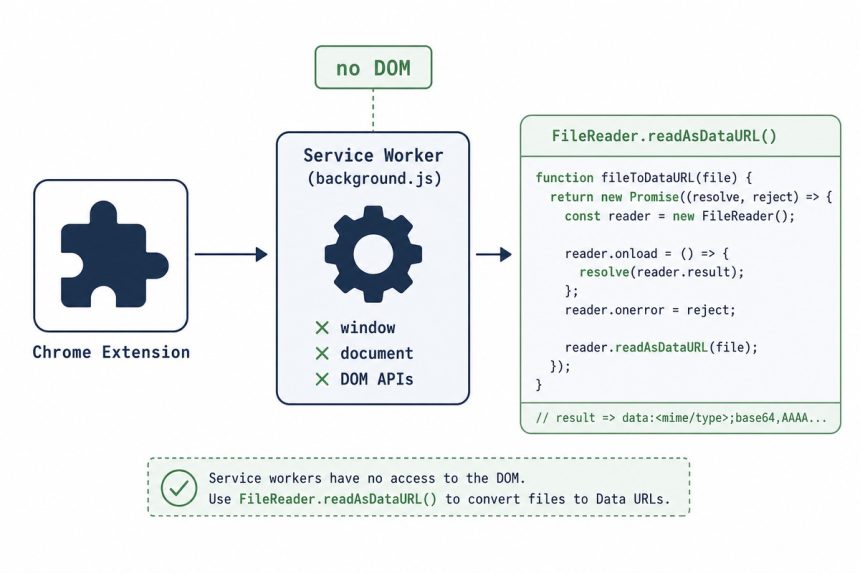
If you see TypeError: URL.createObjectURL is not a function in a Chrome extension service worker, the cause is straightforward: that API isn’t available in service-worker contexts. Manifest V3 replaced the background page (which had a DOM) with a service worker (which doesn’t), and URL.createObjectURL requires a document. Switch to FileReader.readAsDataURL to make a data: URL instead, which works without a DOM.
Last verified: 2026-05-17 with Chrome 124 (Manifest V3). Originally published 2022-09-16, rewritten and updated 2026-05-17.
The broken version
// In background.js (MV3 service worker)
fetch(url).then(data => {
    let dataUrl = URL.createObjectURL(data.blob());   // TypeError
    chrome.downloads.download({ url: dataUrl, filename: 'image.png' });
});
Two bugs: data.blob() returns a promise that has to be awaited, and URL.createObjectURL isn’t available in service workers.
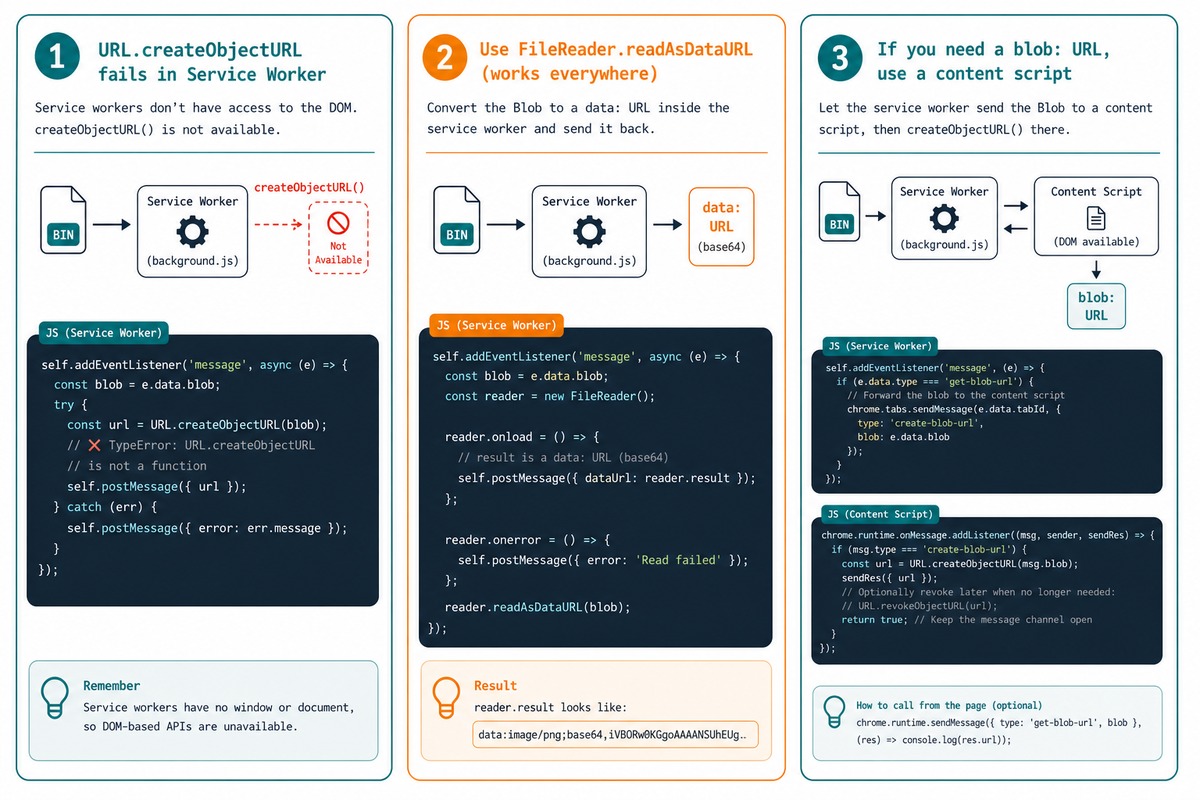
The fix — use a data URL
async function downloadImage(url, filename) {
    const res  = await fetch(url);
    const blob = await res.blob();

    const reader = new FileReader();
    reader.readAsDataURL(blob);
    reader.onloadend = () => {
        chrome.downloads.download({
            url:      reader.result,    // "data:image/png;base64,..."
            filename: filename || 'image.png',
        });
    };
}
FileReader.readAsDataURL produces a complete data: URL — a base64-encoded inline representation of the blob. The result works wherever a URL string works, including the url parameter of chrome.downloads.download. No DOM required.
Alternative — let Chrome download the URL directly
// If you don't need to inspect or modify the bytes, just pass the URL straight through
chrome.downloads.download({
    url:      'https://example.com/image.png',
    filename: 'image.png',
});
The downloads API does its own fetching — for a public URL, skipping the fetch+blob round-trip avoids the problem entirely.
If you really need a blob URL — do it from a content script
// content.js — runs in the page context, has a DOM
const res  = await fetch(url);
const blob = await res.blob();
const blobUrl = URL.createObjectURL(blob);

// Then pass it back to the service worker if it needs to act on it
chrome.runtime.sendMessage({ action: 'download', url: blobUrl });
Blob URLs are scoped to the document that created them — so the content script must be the one that calls chrome.downloads.download, or wire the actual download up through a message-passed proxy.
Frequently asked questions
URL.createObjectURL available in MV3 service workers? Manifest V3 replaced the background page with a service worker, which doesn’t have a DOM. URL.createObjectURL requires a document context to produce blob URLs scoped to a window — service workers have no window, so the function is undefined. Use a data: URL (from FileReader.readAsDataURL) or do the work from a content script / popup that does have a document.
A blob URL (blob:...) is a pointer to in-memory data, scoped to the document that created it; the actual bytes never leave the browser. A data URL (data:image/png;base64,...) embeds the bytes inline as base64-encoded text. Data URLs are bigger (~33% overhead) but self-contained — they work anywhere a URL works, including in MV3 service workers.
Yes, but a data URL inflates the size by ~33%. For multi-MB files, the encoded string can get large enough to stress memory in a service worker. If you’re downloading something huge, consider doing the download from a content script (which has a document and can use URL.createObjectURL) or pass the blob to chrome.downloads.download via a more recent API. For most images, the data-URL approach is fine.
MV3 service worker for headless background work (cron-like scheduled tasks, network calls). Content script for anything that needs DOM access (parsing pages, blob URLs). Popup for UI-driven actions. Move the function that creates the URL into a context where the right APIs exist.
Related guides
- How to Convert an Image to a Base64 String in JavaScript
- How to Get a Website’s Favicon URL with JavaScript
- How to Remove the “Other Favorites” Button in Microsoft Edge
References
Chrome extensions: Migrating to Manifest V3: developer.chrome.com/docs/extensions/develop/migrate. chrome.downloads: developer.chrome.com/docs/extensions/reference/api/downloads. MDN FileReader.readAsDataURL: developer.mozilla.org/en-US/docs/Web/API/FileReader/readAsDataURL.