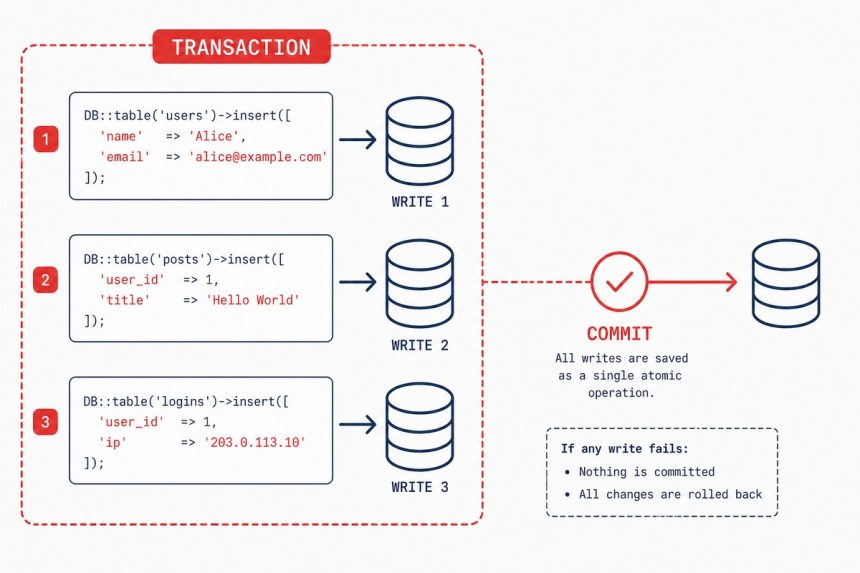
In Laravel, DB::transaction() and DB::beginTransaction() group multiple database writes into one atomic unit — either every query commits or none of them do. Use them whenever a single user action involves multiple writes that must all succeed together. DB::transaction() with a closure is the common form; the explicit beginTransaction/commit/rollBack trio is for cases where the closure form doesn’t fit.
Last verified: 2026-05-17 on Laravel 11. Originally published 2024-03-28, rewritten and updated 2026-05-17.
Why transactions matter
Without a transaction, each query commits independently. If your code does:
// Transfer $100 from account A to account B
$accountA->decrement('balance', 100);    // commit 1
// (server crashes here)
$accountB->increment('balance', 100);    // never runs
…then $100 vanishes. A transaction makes both writes part of one commit — either both happen or the database rolls back to its previous state.
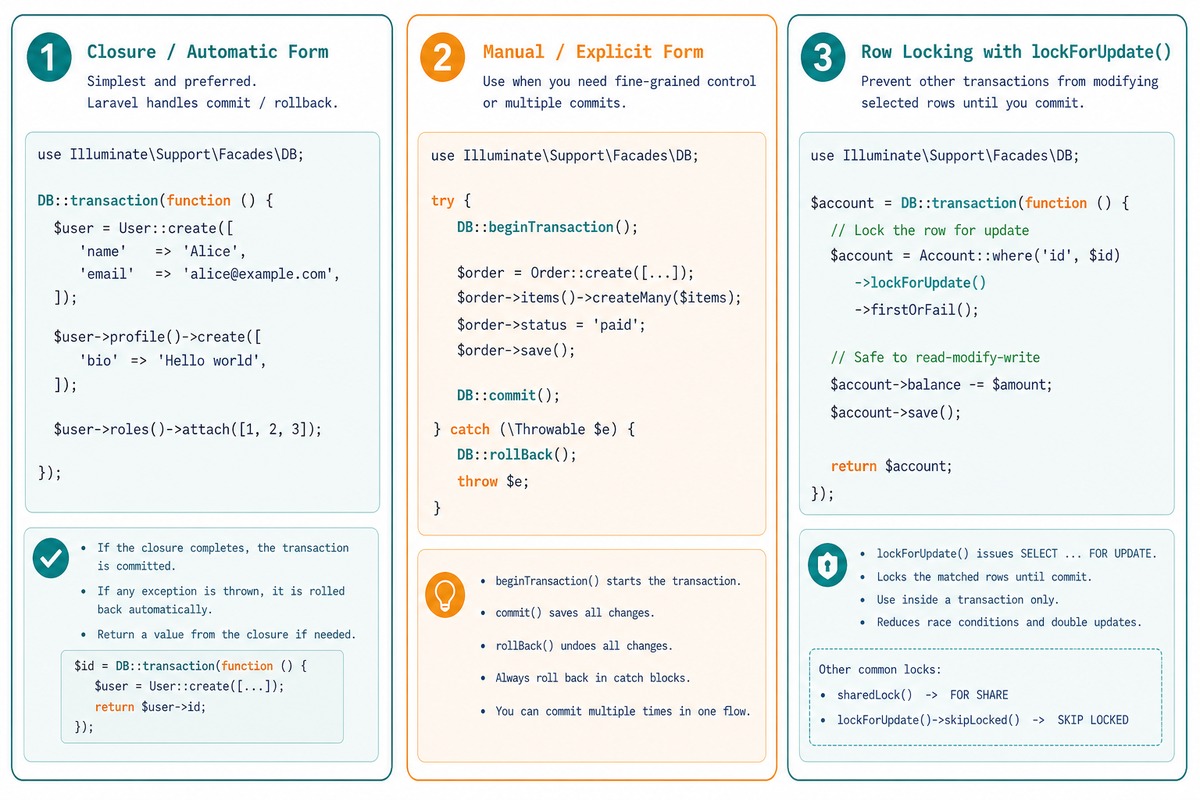
Closure form — DB::transaction()
use Illuminate\Support\Facades\DB;

DB::transaction(function () use ($accountA, $accountB, $amount) {
    $accountA->decrement('balance', $amount);
    $accountB->increment('balance', $amount);
});
Laravel begins the transaction, runs the closure, and commits if it returns normally. If any exception is thrown inside the closure, Laravel rolls back the entire transaction and re-throws the exception for your catch block. No manual commit/rollBack needed.
With deadlock retry
DB::transaction(function () use ($accountA, $accountB, $amount) {
    $accountA->decrement('balance', $amount);
    $accountB->increment('balance', $amount);
}, 3);   // retry up to 3 times on deadlock
The second argument is the retry count. Useful for high-contention writes — concurrent updates of the same row, counter increments, queue claim/release.
Manual form — beginTransaction / commit / rollBack
try {
    DB::beginTransaction();

    DB::insert('insert into ...', [...]);
    DB::update('update ... set ...', [...]);
    DB::delete('delete from ...', [...]);

    DB::commit();
    return response()->json(['ok' => true]);

} catch (\Throwable $e) {
    DB::rollBack();
    report($e);
    return response()->json(['ok' => false, 'error' => $e->getMessage()], 500);
}
Use this when you need to do something between the transaction’s start and commit that doesn’t fit in a closure — release a queue lock, log progress, call into another service. For the common case, the closure form is cleaner.
Pair with lockForUpdate() for concurrency
DB::transaction(function () use ($accountId, $amount) {
    // Lock the row — other transactions wait until ours commits
    $account = Account::lockForUpdate()->findOrFail($accountId);

    if ($account->balance < $amount) {
        throw new \DomainException('Insufficient balance.');
    }

    $account->decrement('balance', $amount);
    // ... rest of the operation
});
lockForUpdate() issues a SELECT ... FOR UPDATE, holding a row-level lock until the transaction commits. Without it, two concurrent withdrawals can both read a balance of $100 and both think they have enough to withdraw $80. With the lock, the second one waits.
When you shouldn’t wrap in a transaction
- Single-write operations. The transaction’s overhead is wasted when there’s nothing to coordinate.
- Long-running operations (file processing, external API calls). The lock duration matters — holding row locks while waiting on a 5-second API call blocks everything else.
- Operations that include non-database side effects. Sending an email or dispatching a webhook can’t be rolled back; if the transaction reverts after the email goes out, the user gets notified of something that didn’t actually happen. Either move the side effect to after the commit (use
DB::afterCommitor a queued job dispatched from inside the transaction) or accept that it’s not part of the atomic unit.
Frequently asked questions
Any time a single user action requires multiple writes that must all succeed or all fail. Classic example: transfer money between two accounts (debit one, credit the other) — losing the credit half mid-transfer is a bug. Other cases: creating a parent record + its children, billing + audit logging, queue-job dispatching that depends on data being saved. If a partial write would leave the database in an invalid state, wrap it.
DB::transaction() or DB::beginTransaction()? DB::transaction() for the common case — Laravel handles commit/rollback automatically and even retries on deadlock if you pass a number as the second argument. Use the explicit beginTransaction/commit/rollBack form when you need to do something between the transaction’s start and the commit that doesn’t fit in a closure (release a queue lock, log progress, call into another service).
DB::transaction() retry on failure? Yes — pass a second argument: DB::transaction(fn () => ..., 3) retries up to 3 times if the transaction fails due to a deadlock. Doesn’t retry on other exceptions. Useful for high-contention writes (concurrent updates of the same row, counter increments).
A transaction groups multiple writes into one atomic unit. A lock (SELECT ... FOR UPDATE, lockForUpdate() in Eloquent) prevents other transactions from reading or modifying a row while yours is in flight. They work together: start a transaction, lock the rows you’ll update, do the writes, commit. The transaction guarantees all-or-nothing; the lock guarantees nobody else interferes mid-way.
Related guides
- How to Insert or Update Records in Laravel Eloquent
- How to Automatically Delete Related Rows in Laravel Eloquent
- How to Use LEFT JOIN in Laravel to Keep All Records
References
Laravel database transactions: laravel.com/docs/database#database-transactions. Eloquent pessimistic locking: laravel.com/docs/queries#pessimistic-locking. DB::afterCommit: laravel.com/docs/queues#jobs-and-database-transactions.